Invoking AppPage Builder . . Creating Web Applications . . Multimedia Content . . Administration Features . . Related Topics . . Home
AppPage Builder is a Universal Web Connect application that enables you to create and maintain the AppPages that make up your Web applications. You can use AppPage Builder to create AppPages with any Web browser that supports forms and tables, as defined in the HTML 3.0 specification. If you use a Web browser that supports client file upload, you can also use AppPage Builder to manage multimedia content in the Informix database.
Specify the following variable settings to invoke AppPage Builder. Set all of these variables in your configuration file (wcconfig.std), or specify one or more of them in the URL that invokes AppPage Builder.
| Variable | Mandatory? | Content |
|---|---|---|
| MItab | Yes | Specifies the name of the database table in which the AppPages for the Web application are stored. |
| MIcol | Yes | Specifies the name of the column that contains the AppPage in the Web application table. |
| MInam | Yes | Specifies the name of the column that identifies the appropriate row of the Web application table. |
| MIval | Yes | Specifies the value to check against the MInam column to identify the row you want to retrieve in the Web application table. |
For example, the following configuration file provides settings for all of these variables:
APP wcdaemon.exe
MI_WEBBINDIR   $INFORMIXDIR\bin
MI_WEBWORKDIR  $INFORMIXDIR\bin
MI_DATABASE    database@server # database@server
MI_USER        user            # database user
MI_PASSWORD    password        # database user password
MItab          webPages        # table that contains AppPages
MIcol          object          # blob column that contains AppPages
MInam          ID              # column that contains unique identifiers for AppPages
MIval          apb             # default identifier
ENDAPP
With these application settings, you invoke AppPage Builder by default when you make a connection:
NT:   http://myhost:myport/ifmx-bin/wcdrvr.exe/wcdaemon.exe

UNIX: http://myhost:myport/ifmx-bin/wcdrvr/wcdaemon
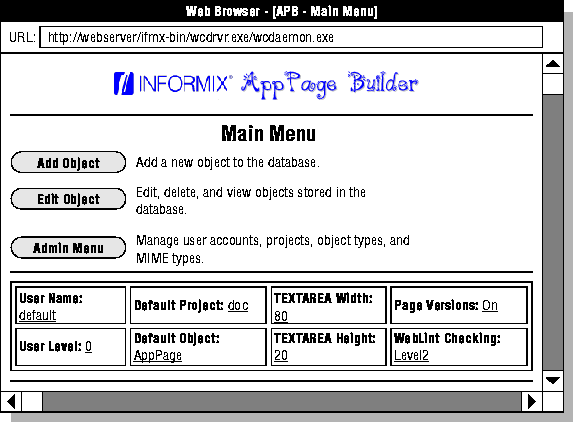
When you invoke AppPage Builder, the following AppPage is displayed.
|
|
Use AppPage Builder to create and maintain AppPages and other multimedia objects that make up your Web applications. The following table describes the AppPage Builder options displayed in the AppPage Builder main menu.
| Option | Task |
| Add Object | Add a new AppPage, User Dynamic Tag, Audio, Document, Image, Video, or other Web application object. |
| Edit Object | Edit, delete, or view a Web application object. |
| Admin Menu | Edit or delete a user account. Add, edit, or delete a project. Add a new MIME type. Add a new object type. |
The following table lists the currently supported object types and the corresponding AppPage Builder schema table in which the objects are stored.
| Object Type | Supported Formats | Table |
| AppPage | HTML | webPages |
| User Dynamic Tag | HTML | webTags |
| Audio | AU, WAV, and AIFF | webAudios |
| Document | MS Word, MS PowerPoint, and Adobe PDF | webDocuments |
| Image | GIF and JPEG | webImages |
| Video | QuickTime, MPEG, and AVI | webVideos |
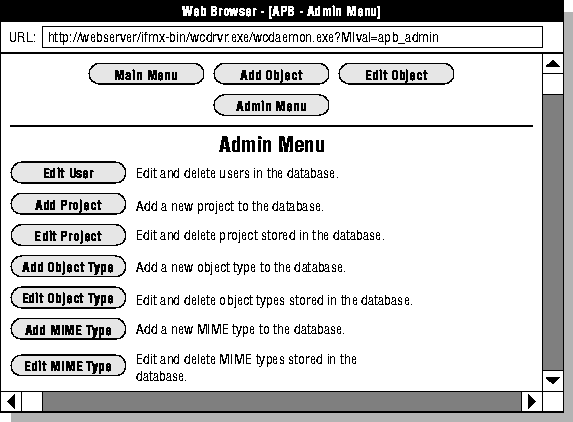
When you invoke the Admin Menu of APB, the following AppPage is displayed.
|
|
The following table describes the tasks you can perform for each Admin Menu option.
| Option | Task |
| Edit User | Modify user preferences, including changing the user password, changing the default project or object type, changing the TEXTAREA height or width, turning page versioning on or off, and changing the level of WebLint checking for syntax errors. |
| Add Project | Add a new project. A project contains all of the AppPages and other objects associated with a particular Web application. |
| Edit Project | Change the owner or the description of a project. |
| Add Object Type | Add new multimedia object types to AppPage Builder. |
| Edit Object Type | Modify the page suffix for an object type. |
| Add MIME Type | Add new MIME types to existing object types. |
| Edit MIME Type | Edit an existing MIME type. |
Using AppPage Tags
Using Variables and Variable Expressions in AppPages