
Attributes . . Usage . . Related Topics . . Tag Index . . Home
The MISQL tag enables you to execute SQL statements and display the result of those statements in an AppPage. The expansion of SQL takes place in the database engine before the resulting HTML is returned to the client.
| SQL | Specifies a single SQL statement. The statement must be executable inside a transaction block. |
| NAME | Specifies the name of the variable to which the formatted results of the MISQL tag are assigned. If NAME is not specified, the results are output. |
| WINSTART | Specifies the first row in the current data set to process. |
| WINSIZE | Specifies the maximum number of rows to be processed. |
| CONN | Specifies the connection to use for the specified SQL statement. After the MISQL tag is executed, the previously active connection is reestablished. |
| COND | A variable or variable expression that evaluates to FALSE (0) or TRUE (nonzero). Conditions are evaluated from left to right. The tag is enabled only if this condition evaluates to TRUE. For an example, see the MIBLOCK tag. |
| ERR | Specifies how an error should be processed. Because multiple errors can occur on an AppPage, use the ERR attribute to link the error processing to a particular MIERROR tag. For more information on the ERR attribute, see the MIERROR tag. |
Specify the SQL statement to retrieve or modify database data in the SQL attribute of the MISQL tag. Specify formatting information, which indicates how to display the results of the SQL statement, between the start and end MISQL tags. The following section describes how to format the results of the SQL statement executed in the MISQL tag. The following is an example of an MISQL tag:
<?MISQL CONN="myconn" SQL="select name, company from customers;">$1 $2 <BR><?/MISQL>
For each row returned by the SQL statement executed, the output is formatted according to the specifications between the start and end MISQL tags. You can use system variables to:
The following sections describe the system variables you can use to format SQL output.
To specify a column variable, use the format $#, where
# is a column number from 1 up to the maximum number of columns in
the row. Column variables are $1 for the first column, $2
for the second column, and so on. To specify all the columns, use
an asterisk ( $* ), as described later in this section.
The following select1 AppPage illustrates the use of column variables:
  <HTML>
  <HEAD><TITLE>Simple Select 1</TITLE></HEAD>
  <BODY>
  <?MISQL SQL="select first_name, last_name, title
    from staff;">
  <B>$1 $2</B>, $3<BR><?/MISQL>
  </BODY>
  </HTML>
The following is sample output returned to the client:
  <HTML>
  <HEAD><TITLE>Simple Select 1</TITLE></HEAD>
  <BODY>
  <B>John Somebody</B>, Senior Consultant<BR>
  <B>Joe Average</B>, Consultant<BR>
  <B>Mark Markup</B>, Software Development Engineer<BR>
  </BODY>
  </HTML>
The following is sample Web browser output.
|
To specify a row index, use the format [#], where # is
a number from 1 to the maximum number of rows in the result set. If you
do not specify a row index, [1] is assumed. The highest row
index dictates the size of the data window that is displayed. The
following select2 AppPage illustrates column and row formatting specifications
and the corresponding output:
  <HTML>
  <HEAD><TITLE>Simple Select 2</TITLE></HEAD>
  <BODY>
  <TABLE BORDER>
  <?MISQL SQL="select first_name, last_name from staff;">
    <TR> <TD> $1 $2 </TD><TD> $1[2] $2[2] </TD> </TR>
  <?/MISQL>
  </TABLE>
  </BODY>
  </HTML>
The following is sample output returned to the client:
  <HTML>
  <HEAD><TITLE>Simple Select 2</TITLE></HEAD>
  <BODY>
  <TABLE BORDER>
  <TR> <TD> John Somebody </TD><TD> Joe Average</TD> </TR>
  <TR> <TD> Mark Markup </TD><TD> NOVALUE NOVALUE</TD> </TR>
  </TABLE>
  </BODY>
  </HTML>
The following is sample Web browser output.
 |
The preceding data set is processed two rows at a time because [2]
is the highest row index specified. If [3] was the highest
row index specified, the data would be processed three rows at a time, and
so on.
When you process multiple rows at a time, you might need to display rows with no value for the columns. See MI_NULL and MI_NOVALUE Variables for information on how to specify the output format for columns that have no value.
To display items repeated with every column, use a $* within
curly braces ( { } ). This formatting technique is useful when
you do not know the number of rows or columns that will be retrieved for
display. The select3 AppPage displays each column in a separate table
cell:
  <HTML>
  <HEAD><TITLE>Simple Select 3</TITLE></HEAD>
  <BODY>
  <TABLE BORDER>
  <?MISQL SQL="select * from staff;">
    <TR> {<TD> $* </TD>} </TR>
  <?/MISQL>
  </TABLE>
  </BODY>
  </HTML>
The following is sample output returned to the client:
  <HTML>
  <HEAD><TITLE>Simple Select 3</TITLE></HEAD>
  <BODY>
  <TABLE BORDER>
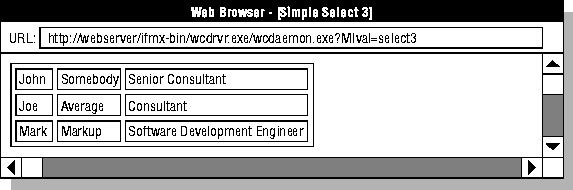
  <TR> <TD> John </TD><TD> Somebody </TD><TD> Senior Consultant </TD> </TR>
  <TR> <TD> Joe </TD><TD> Average </TD><TD> Consultant </TD> </TR>
  <TR> <TD> Mark </TD><TD> Markup </TD><TD> Software Development Engineer </TD> </TR>
  </TABLE>
  </BODY>
  </HTML>
The following is sample Web browser output.
 |
The following table lists additional system variables set by the database engine when an SQL statement is executed within the MISQL tag. You can use these processing variables to display more information about the results of the SQL statement.
Variable |
When Set? |
Description |
|---|---|---|
| MI_COLUMNCOUNT | On execution | Specifies the number of columns retrieved in the SQL statement. |
| MI_CURRENTROW | On current row | Specifies the current formatted row being displayed during execution of the SQL statement. Set to the number of formatted rows displayed after the MISQL tag has been executed. |
| MI_ERRORCODE | On error | Specifies the error code returned from the SQL statement. For an example, see the MIERROR tag. |
| MI_ERRORMSG | On error | Specifies the error message returned from the SQL statement. For an example, see the MIERROR tag. |
| MI_ROWCOUNT | After execution | Specifies the number of rows retrieved in the SQL statement. Updated after processing is complete. |
| MI_SQL | On execution | Specifies the SQL statement executed. |
The following select4 AppPage displays the number of rows returned by the last query executed:
  <HTML>
  <HEAD><TITLE>Simple Select 4</TITLE></HEAD>
  <BODY>
  <TABLE BORDER>
  <?MISQL SQL="select * from staff;">
  <TR> {<TD> $* </TD>} </TR>
  <?/MISQL>
  </TABLE>
  <HR>
  <B>This query retrieved:</B>
  <?MIVAR> $MI_ROWCOUNT <?/MIVAR> <B> rows </B>
  </BODY>
  </HTML>
The following is sample Web browser output.
 |
When you format your SQL output, NULL is displayed
by default if a column has a null value. NOVALUE is displayed
by default if you specify a column variable greater than the number of columns
in the row or if there is no value for a column when the output is formatted
to display multiple rows on the same line. Use the MI_NULL variable to specify
the text to be displayed when a null value is retrieved. Use the MI_NOVALUE
variable to specify the text to be displayed when no value is retrieved.
In the following select5 AppPage, the MI_NULL and MI_NOVALUE variables
are assigned to a blank space:
  <HTML>
  <HEAD><TITLE>Simple Select 5</TITLE></HEAD>
  <BODY>
  <TABLE BORDER>
  <?MIVAR NAME=$MI_NOVALUE> <?/MIVAR>
  <?MIVAR NAME=$MI_NULL> <?/MIVAR>
  <?MISQL SQL="select first_name, last_name from celebrities;">
  <TR> <TD> $1 $2 </TD><TD> $1[2] $2[2] </TD> </TR> <?/MISQL>
  </TABLE>
  </BODY>
  </HTML>
The following is sample output returned to the client:
  <HTML>
  <HEAD><TITLE>Simple Select 5</TITLE></HEAD>
  <BODY>
  <TABLE BORDER>
  <TR> <TD> Jerry Lewis </TD><TD> Frank Sinatra </TD> </TR>
  <TR> <TD> Dean Martin </TD><TD> Cher   </TD> </TR>
  <TR> <TD> Madonna   </TD><TD> </TD> </TR>
  </TABLE>
  </BODY>
  </HTML>
The following is sample Web browser output.
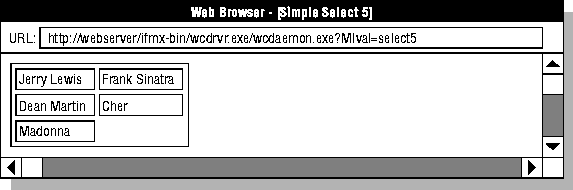 |
A blank space replaces the NULL last_name for Cher and Madonna. Because an odd number of rows is retrieved, a blank space also replaces the columns that have no value in the last table cell.
The WINSIZE attribute limits the number of rows displayed in the output of the MISQL tag. Use WINSIZE to limit the size of the result set being returned across the network if the queries you are executing might return a very large number of rows. Setting this attribute limits the system resources required to execute the query and return the results to the client. The following example limits the result set to 20 formatted rows displayed:
<?MISQL WINSIZE=20 SQL="select * from staff;"> { $* } <BR> <?/MISQL>
Note: If WINSIZE prevents all of the rows in the result set from being retrieved, MI_ROWCOUNT is not updated.
The following Winstart AppPage uses variable WINSTART and WINSIZE
to query the systables table and
display only the rows that are within the current data window. Four rows
are retrieved at a time.
  <HTML>
  <HEAD><TITLE>WINSTART and WINSIZE</TITLE></HEAD>
  <BODY>
  <!--- Initialization --->
  <?MIVAR NAME=WINSIZE DEFAULT=4>$WINSIZE<?/MIVAR>
  <?MIVAR NAME=BEGIN DEFAULT=1>$START<?/MIVAR>
  <!--- Definition of Ranges ---->
  <?MIVAR NAME=BEGIN>$(IF,$(<,$BEGIN,1),1,$BEGIN)<?/MIVAR>
  <?MIVAR NAME=END>$(+,$BEGIN,$WINSIZE)<?/MIVAR>
  <!--- Execution --->
  <TABLE BORDER>
  <?MISQL WINSTART=$BEGIN WINSIZE=$WINSIZE
        SQL="select tabname from systables where tabname like 'web%'
                order by tabname;">
        <TR><TD>$1</TD></TR>
  <?/MISQL>
  </TABLE>
  <BR>
  <?MIBLOCK COND="$(>,$BEGIN,1)">
        <?MIVAR>
        <A HREF=$WEB_HOME?MIval=Winstart&START=$(-,$BEGIN,$WINSIZE)&WINSIZE=$WIN
SIZE>
        Previous $WINSIZE Rows </A> $(IF,$(<,$MI_ROWCOUNT,$WINSIZE), No More Row
s,  )
        <?/MIVAR>
  <?/MIBLOCK>
  <?MIBLOCK COND="$(AND,$(>,$END,$WINSIZE),$(>=,$MI_ROWCOUNT,$WINSIZE))">
        <?MIVAR>
        <A HREF=$WEB_HOME?MIval=Winstart&START=$END&WINSIZE=$WINSIZE>
        Next $WINSIZE Rows  </A>
        <?/MIVAR>
  <?/MIBLOCK>
  </BODY>
  </HTML>
Using Variables and Variable Expressions in AppPages.
For information about how to escape special characters (", {, }, and $) so that they are interpreted literally, see Special Characters in AppPage Tags.