| DataBlade Module Installation and Registration Guide Registering with the BladeManager Graphical User Interface |
|
|
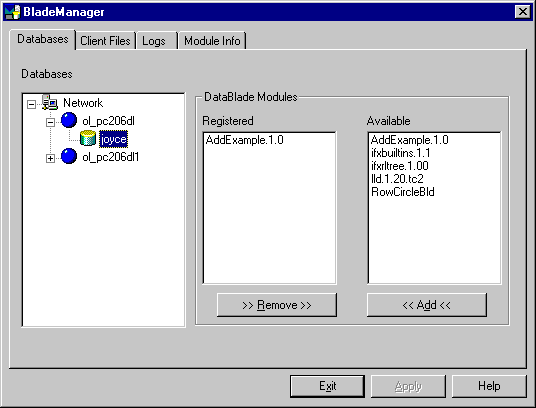
To manage DataBlade modules, use the Databases page, as shown in Figure 2-1.
Managing DataBlade modules consists of tasks described in the following subsections:
After you install a DataBlade module, you register it in each database in which you want to use it. To register a DataBlade module, you must first connect to that database.
See the Administrator's Guide for Informix Dynamic Server 2000 for information on the connect and resource permissions you need to connect to the database.
 Tip: You can be sure you have the right permissions if you run BladeManager as the default user for the database server. You can tell you are the default user if you are not prompted for a user name and password when you attempt to connect to the database. You can use the Setnet32 utility to specify the user name and password you want to be the default for a particular database server. Make sure you restart BladeManager whenever you change settings in Setnet32.
To connect to a database
After you connect, BladeManager displays the registered and available DataBlade modules for that database.
The first time BladeManager connects to a database, BladeManager prepares the installed DataBlade modules for registration and generates a log file. During the preparation, BladeManager gathers the DataBlade module information that appears on the BladeManager pages. If the preparation of a DataBlade module fails, the DataBlade module does not appear in the Available list box. Check the log file for information about preparation failures (see Viewing Log Files) and see Appendix A, Troubleshooting Registration Problems, for possible solutions.
When BladeManager registers a DataBlade module, it executes a set of SQL statements to register each database object in the module. Registration is equivalent to creating database objects individually with the SQL CREATE statement.
You must have resource permissions on the database to register a DataBlade module in it.
If registration fails, BladeManager returns the database to its prior state. To see the SQL statements that failed, look at the corresponding log file (see Viewing Log Files) and see Appendix A, Troubleshooting Registration Problems, for possible solutions.
Some DataBlade modules depend on one or more interfaces. An interface is like a contract between DataBlade modules: the DataBlade module that requires the interface depends on the functionality of the DataBlade module that provides the interface.
When you register a DataBlade module with an interface dependency, BladeManager verifies that one of the DataBlade modules that provides that interface is registered in the database. If it is, registration continues. If it is not, BladeManager displays the Modules with Missing Interface dialog box; select one of the DataBlade modules and click OK.
 Important: You can register DataBlade modules written in Java only in database servers that contain the Informix J/Foundation upgrade to Informix Dynamic Server 2000. For more information about Informix J/Foundation, see the manual "Creating UDRs in Java."
Important: BladeManager does not verify the integrity of the DataBlade modules that provide a required interface; BladeManager does not check for the presence of the required database objects.
Upgrading a DataBlade Module
To upgrade a DataBlade module, use BladeManager to register a new version of the module. When you register the new version, BladeManager will automatically unregister the old version.
Important: You cannot use the following procedure to upgrade or downgrade some versions of DataBlade modules. For instructions on which versions can be upgraded or downgraded, see the release notes for the DataBlade module.
To upgrade a DataBlade module
If the upgrade fails, BladeManager returns the database to its prior state. To see the SQL statements that failed, look at the corresponding log file (see Viewing Log Files) and see Appendix A, Troubleshooting Registration Problems, for possible solutions.
To downgrade a DataBlade module, use this same procedure to replace the DataBlade module with an earlier version, which appears in the Available list box.
When BladeManager unregisters a DataBlade module, it removes each object of the module from the database by using SQL DROP statements.
Important: BladeManager does not unregister a DataBlade module that provides a required interface for other DataBlade modules or database objects.
To unregister a DataBlade module
If the unregistration fails, BladeManager returns the database to its prior state. To see the SQL statements that failed, look at the corresponding log file (see Viewing Log Files) and see Appendix A, Troubleshooting Registration Problems, for possible solutions.