| Informix DataBlade API Programmer's Manual Using Complex Data Types |
|
|
A collection is a complex data type that is made up of elements, each of which has the same data type. A collection is similar to an array in the C language. The DataBlade API provides support for collections in both their text and binary representations.
The DataBlade API supports a collection in text representation as a quoted string with the following format:
A collection in its text representation is often called a collection string. For example, the following collection string provides the text representation for a SET of integer values:
For a complete description of the text representation of a collection, see the description of the Literal Collection segment in the Informix Guide to SQL: Syntax.
The database server supports the following kinds of collections.
All collection data types use the same internal format to store their values. For more information on the collection data types, see the Informix Guide to SQL: Reference.
 Tip: The internal format of a collection data type is often referred to as its binary representation.
The DataBlade API supports the following SQL collection data types and data structures:
A collection structure, MI_COLLECTION, is a DataBlade API structure that holds the collection (LIST, MULTISET, or SET) and its elements. The following table summarizes the memory operations for a collection structure.
| Default Memory Duration |
Memory Operation | Function Name |
|---|---|---|
| Current memory duration | Constructor | mi_collection_copy(), mi_collection_create() |
| Destructor | mi_collection_free() |
The following DataBlade API functions return an existing collection structure.
|
DataBlade API Function | Description |
|---|---|
| mi_value(), mi_value_by_name() | Returns a collection structure as a column value when the function returns an MI_COLLECTION_VALUE value status |
A collection descriptor, MI_COLL_DESC, is a DataBlade API structure that contains a collection cursor to access elements of a collection. The following table summarizes the memory operations for a collection descriptor.
| Default Memory Duration |
Memory Operation | Function Name |
|---|---|---|
| Current memory duration | Constructor | mi_collection_open(), mi_collection_open_with_options() |
| Destructor | mi_collection_close() |
 Important: To a DataBlade API module, the collection descriptor (MI_COLL_DESC) is an opaque C data structure. Do not access its internal fields directly. Informix does not guarantee that the internal structure of a collection descriptor will not change in future releases. Therefore, to create portable code, always use the functions that access collection elements.
Creating a Collection
To create a collection, use the mi_collection_create() function. The mi_collection_create() function is the constructor function for the collection structure (MI_COLLECTION). The collection structure includes the type of collection (LIST, MULTISET, or SET) and the element data type.
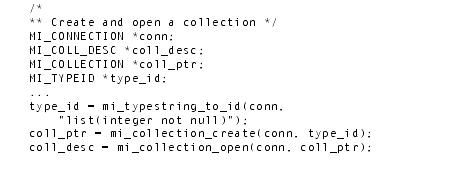
The following code shows an example of how to use the mi_collection_create() function to create a new list of integers:
Once you have a collection structure for a collection, you can open the collection with one of the functions in Figure 5-1.
Figure 5-1
Both of the functions in Figure 5-1 are constructor functions for a collection descriptor. Use this collection descriptor in calls to DataBlade API functions that access the collection.
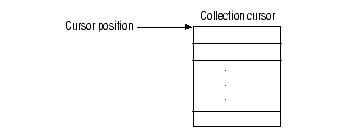
When the functions in Figure 5-1 open a collection, they create a collection cursor, which is an area of memory that serves as a holding place for collection elements. This cursor has an associated cursor position, which points to the one element of the collection cursor. When these functions complete, the cursor position points to the first element in the cursor.
The difference between the mi_collection_open() and mi_collection_open_with_options() functions is the open mode that they create for the collection cursor.
When you open a collection with mi_collection_open(), you obtain an update scroll cursor to hold the collection elements. Therefore, you can perform the following operations on a collection opened with mi_collection_open().
Figure 5-2 shows an example of using the mi_collection_open() function to create and open a LIST collection with INTEGER elements.
Figure 5-3 shows the cursor position after the mi_collection_open() call.
When you open a collection with mi_collection_open_with_options(), you can override the cursor characteristics that mi_collection_open() uses. The control argument of mi_collection_open_with_options() can open a collection cursor with any of the cursor characteristics in the following table.
Most collections need the capabilities of the read/write scroll cursor that mi_collection_open() creates. However, the database server can perform a special optimization for a collection from a collection subquery if you use a read-only sequential cursor to hold the collection subquery. It can fetch each row of the subquery on demand. That is, you can fetch the elements one at a time with mi_collection_fetch(). If a collection subquery resides in some other type of cursor, the database server fetches all the rows of the subquery and puts them in the collection cursor.
To create a collection subquery, preface the query with the MULTISET keyword. For example, the following SQL statement creates a collection subquery of order numbers for customer 120 and then sends them to the check_orders() user-defined function (which expects a MULTISET argument)
To have the database server perform the collection-subquery optimization, use the following call to mi_collection_open_with_options() when you open a collection subquery:
The DataBlade API provides the following functions for accessing collection data types.
When you open a collection cursor with mi_collection_open(), the cursor position points to the first element of the collection. The cursor position identifies the current element in the collection cursor. The DataBlade API functions that access a collection must specify where in the collection to perform the operation. To specify location, these functions all have an action argument that supports the cursor-action flags in Figure 5-4.
Figure 5-4
You insert an element into an open collection with the mi_collection_insert() function. You can perform an insert operation only on a read/write cursor. An insert is not valid on a read-only cursor.
The mi_collection_insert() function uses an MI_DATUM value to represent a element that it inserts into a collection. The contents of this MI_DATUM depends on the passing mechanism that the function used, as follows:
 In a C UDR: when mi_collection_insert() inserts an element value, it can pass the MI_DATUM by reference or by value, depending on the data type of the column value.
 In a client LIBMI application: when mi_collection_insert() inserts an element value, it always passes the MI_DATUM by reference. Even for values that can be passed by value in a C UDR (such as INTEGER), this function passes the element value by reference.
 The mi_collection_insert() function inserts the new element at the location in the collection cursor that its action argument specifies. For a list of valid cursor-action flags, see Figure 5-4 on page 5-11.
 The following call to mi_collection_insert() can pass in an actual value because it inserts an INTEGER element into a collection and integer values are passed by value in a C UDR:
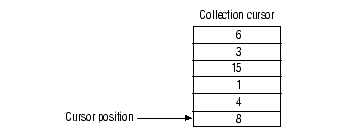
Figure 5-5 shows the cursor position after the preceding calls to mi_collection_insert() complete.
These mi_collection_insert() calls specify absolute addressing (MI_CURSOR_ABSOLUTE) for the collection because the collection is defined as a LIST. Only LIST collections have ordered position assigned to their elements.
You fetch an element from an open collection with the mi_collection_fetch() function. You can perform a fetch operation on a read/write or a read-only cursor. To fetch a collection element, you must specify:
The mi_collection_fetch() function obtains from the collection cursor the element that its action argument specifies. For a list of valid cursor-action flags, see Figure 5-4 on page 5-11. You can move the cursor position back to the beginning of the cursor with the following mi_collection_fetch() call, as the following example shows:
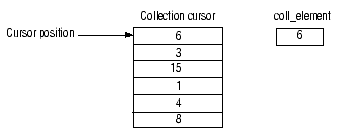
The preceding mi_collection_fetch() call moves the cursor position backward with respect to its position after the calls to mi_collection_insert() (Figure 5-5 on page 5-13). Therefore, it is valid only for:
Figure 5-6 shows the cursor position and coll_element value after the preceding call to mi_collection_fetch():
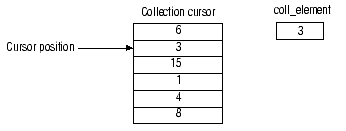
Figure 5-7 shows the cursor position and value of coll_element after the following mi_collection_fetch() call:
Figure 5-8 shows the cursor position and value of coll_element after the following mi_collection_fetch() call:
The preceding mi_collection_fetch() call is valid only if the collection is a LIST. Only LIST collections are ordered. Therefore relative fetches, which specify the number of elements to move forward or backward, can only be used on LIST collections. If you try to perform a relative fetch on a SET or MULTISET, mi_collection_fetch() generates an error.
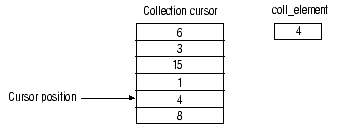
Figure 5-9 shows the cursor position and value of coll_element after the following mi_collection_fetch() call:
Because the preceding mi_collection_fetch() call moves the cursor position backward, the call is valid only if the collection cursor is a scroll cursor. When you open a collection with mi_collection_open(), you get a read/write scroll collection cursor. However, if you open the collection with mi_collection_open_with_options() and the MI_COLL_NOSCROLL option, mi_collection_fetch() generates an error.
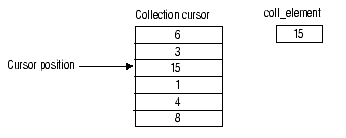
Figure 5-10 shows the cursor position and value of coll_element after the following mi_collection_fetch() call:
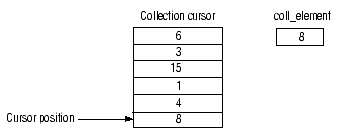
The preceding mi_collection_fetch() call is valid only if the collection is a LIST. Because absolute fetches specify a position within the collection by number, they can only be used on an ordered collection (a LIST). If you try to perform an absolute fetch on a SET or MULTISET, mi_collection_fetch() generates an error.
Because there are only six elements in this collection, the absolute fetch of 6 positions the cursor on the last element in the collection. This result is the same as if you had issued the following mi_collection_fetch():
The fetch last is useful when you do not know the number of elements in a collection and want to obtain the last one.
Obtaining the Element ValueThe mi_collection_fetch() function uses an MI_DATUM value to represent an element that it fetches from a collection. You must pass in a pointer to the value buffer in which mi_collection_fetch() puts the element value. However, you do not have to allocate memory for this buffer. The mi_collection_fetch() function handles memory allocation for the MI_DATUM that it passes back.
The contents of the MI_DATUM that holds the retrieved element depends on the passing mechanism that the function used, as follows:
 In a C UDR: when mi_collection_fetch() passes back an element value, it passes back the MI_DATUM by reference or by value, depending on the data type of the column value.
  In a client LIBMI application: when mi_collection_fetch() passes back an element value, it always passes back the MI_DATUM by reference. Even for values that can be passed by value in a C UDR (such as INTEGER), this function passes back the element value by reference.
Important: The difference in behavior of mi_collection_fetch() between C UDRs and client LIBMI applications means that collection-retrieval code is not completely portable between these two types of DataBlade API module. When you move your DataBlade API code from one of these uses to another, you must change the collection-retrieval code to use the appropriate passing mechanism for element values that mi_collection_fetch() returns.
You declare a value buffer for the fetched element and pass in the address of this buffer to mi_collection_fetch(). You can declare the buffer in either of the following ways:
Figures 5-6 through Figure 5-10 fetch elements from a LIST collection of INTEGER values. To fetch elements from this LIST, you can declare the value buffer as follows:
 Because you can pass INTEGER values by value in a C UDR, you access the MI_DATUM that these calls to mi_collection_fetch() pass back as the actual value, as follows:
If the element type is a data type that must be passed by reference, the contents of the MI_DATUM that mi_collection_fetch() passes back is a pointer to the actual value. The following call to mi_collection_fetch() also passes in the value buffer as a pointer. However, it passes back an MI_DATUM that contains a pointer to a FLOAT (mi_double_precision) value:
 For the fetches in Figures 5-6 through Figure 5-10, a client LIBMI application declares the value buffer in the same way as a C UDR. However, because all data types are passed back by reference, the MI_DATUM that mi_collection_fetch() passes back contains a pointer to the INTEGER value, not the actual value itself:
You update an element in an open collection with the mi_collection_update() function. You can perform an update operation only on a read/write cursor. An update is not valid on a read-only cursor.
The mi_collection_update() function uses an MI_DATUM value to represent the new value for the element it updates in a collection. The contents of this MI_DATUM depends on the passing mechanism that the function used, as follows:
 In a C UDR: when mi_collection_update() updates an element value, it can pass the MI_DATUM by reference or by value, depending on the data type of the column value.
  In a client LIBMI application: when mi_collection_update() updates an element value, it always passes the MI_DATUM by reference. Even for values that can be passed by value in a C UDR (such as INTEGER), these functions return the column value by reference.
 The mi_collection_update() function updates the element at the location in the collection cursor that its action argument specifies. For a list of valid cursor-action flags, see Figure 5-4 on page 5-11.
 The following code shows an example of using the mi_collection_update() function to update the first element in a collection:
You delete an element from an open collection with the mi_collection_delete() function. You can perform a delete operation only on a read/write cursor. A delete is not valid on a read-only cursor.
The mi_collection_delete() function deletes the element at the location in the collection cursor that its action argument specifies. For a list of valid cursor-action flags, see Figure 5-4 on page 5-11.
The following code shows an example of using the mi_collection_delete() function to delete the last element of a collection: