| DataBlade Module Development Overview DataBlade Module Concepts |
|
|
You can include the following objects in the DataBlade module project you create with the DataBlade Developers Kit:
The DataBlade Developers Kit generates the SQL for each of the objects that you define or include. The objects are described in the following sections.
 Important: Not all database objects and options described in this section are available with all versions of Dynamic Server. For more information, see the "DataBlade Developers Kit User's Guide."
Aggregates
An aggregate is a set of functions that returns information about a set of query results. For example, the built-in SUM aggregate adds the values returned from a query and returns the result. An aggregate is invoked in SQL as a single function, but it is implemented as one or more support functions.
You can define two types of aggregates:
The built-in aggregates are AVG, COUNT, MAX, MIN, SUM, RANGE, STDEV, and VARIANCE. The COUNT aggregate is defined for all data types. For more information on these aggregates, see the Informix Guide to SQL: Syntax.
For more information on defining aggregates, see the DataBlade Developers Kit User's Guide.
The database server uses data types to determine how to store and retrieve different kinds of data.
The following table lists the categories of data types available to you when you create a DataBlade module. You must define some of these data types; others you can use just as they are.
An extended data type is a data type that is not built into your Informix database server. Extended data types include opaque data types, distinct data types, collection data types, and row data types. Extended data types are described in the Extending Informix Dynamic Server 2000 manual.
Collection and row data types are extended data types built from a combination of other data types; their components are accessed through SQL statements.
Built-in data types include character, numeric, time, large object, and Boolean data types. You can use built-in data types as building blocks in opaque, distinct, row, and collection data types.
Built-in data types are automatically included in your DataBlade module project file as imported objects.
For a complete list and descriptions of built-in data types, see the Informix Guide to SQL: Reference manual.
A qualified data type is a built-in data type that has an added qualification that specifies information about the storage size, range of values, or precision of the type. For example, the DECIMAL(p,s) data type can take qualifiers for precision (the total number of digits) and scale (the total number of digits to the right of the decimal point).
You must define a qualified data type by specifying its qualifications.
ExampleThe DECIMAL(6,3) data type has six digits, with three digits to the right of the decimal point; for example, 123.456.
More InformationFor a complete list of qualified data types and their parameters, see the Informix Guide to SQL: Reference manual.
A distinct data type is an existing data type to which you assign a unique name. The distinct data type inherits all routines from the source data type, but it cannot be directly compared to the source data type without an explicit cast.
Why Use a Distinct Data Type?Use a distinct data type if you want to create routines that do not work on the source data type. You can use a distinct data type to control how the data type is cast, or converted, to other data types.
You can use distinct data types to create inheritance hierarchies, which allow you to write very selective routines. A distinct data type can be passed to all routines defined for the source; however, the source data type cannot be passed to routines defined for the distinct data type.
ExampleYou can create two distinct data types based on the MONEY type: lira and us_dollar. To determine the dollar value of a specified lira value, you can create an explicit cast between lira and us_dollar by writing a function that multiplies the value of lira by the exchange rate. Using the cast allows you to perform arithmetic operations involving both distinct data types and to return a meaningful result.
More InformationFor a description of distinct data types, see the Extending Informix Dynamic Server 2000 manual.
A collection data type is a group of values of a single data type in a column. Each value is referred to as an element. A collection data type is defined using a type constructor and an element data type. Type constructors determine whether the database server checks for duplicate elements or orders the elements. The following table describes the collection type constructors.
For a SET, the database server prevents insertion of duplicate elements. For a MULTISET, the database server takes no special actions. For a LIST, the database server orders the elements.
Elements can be almost any data type, including other extended data types and built-in data types such as smart large objects. You can access any element in a collection individually through SQL statements.
The number of elements in a collection is not mandated. You can change the number of elements in a collection without reinserting it into a table, and different rows can have different numbers of elements in their collections.
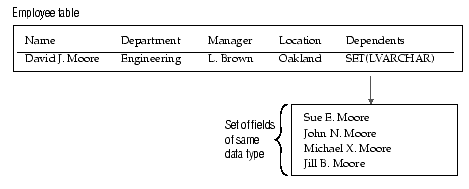
What Does a Collection Look Like?The following diagram illustrates a collection data type using a SET constructor and the LVARCHAR data type in a column called Dependents.
Instead of putting information on dependents in a separate table, all the information is contained in one row, using a collection data type. You can add or remove elements without altering the table's columns.
Why Use a Collection Data Type?You can use collection data types to reconfigure a table with awkwardly long rows by grouping data into a single column. Use a collection if you have data of the same data type that can be naturally grouped into a single column. You can group data even further by creating a collection of row types or other collections.
Collections are also useful as returned values: for example, a group of values from many rows in a column or fields in a row type. For example, if you want to obtain a list of every city in which your employees live from the sample collection data type in Figure 1-2, you could create a collection on the Location column to return a set of values.
The following function types can return collections:
For a description of collection data types, see the Informix Guide to SQL: Tutorial.
A row data type can be thought of as a row of columns, of varying data types, stored in a single database table column. Row data types follow essentially the same rules as database tables. The columns within a row data type are called fields. They can be almost any data type, including other extended data types and built-in data types, such as smart large objects. You can access fields individually using SQL statements.
To create a row data type, you specify:
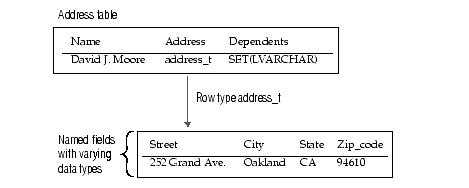
The following diagram illustrates a row type named address_t in a column named Address.
Instead of having additional columns in the Address table, the row data type groups data that is most often accessed together in one column. The table Address consists of the columns Name(LVARCHAR(30)), Address(address_t), and Dependents(SET(LVARCHAR)). The row data type address_t consists of the named fields Street(LVARCHAR(20)), City(LVARCHAR(20)), State(CHAR(2)), and Zip_code(INTEGER).
Why Use a Row Data Type?Like collection data types, row data types allow you to reconfigure your database table. Use a row type if you have data of differing data types that group naturally into a single column. You can further group your data if you include a collection or another row data type as a field within your row data type.
Row data types can be useful for handling smart large objects. For example, if a row data type has a field that is an opaque data type containing an image in a smart large object, the other fields of the row data type could contain additional information about the image.
For best performance, use row data types if most user queries access all or most of the row data type's fields.
You can use row data types to create inheritance hierarchies, allowing you to write very selective routines. A child row data type inherits its parent's fields and can be passed to all routines defined for the parent; however, the parent data type cannot be passed to routines defined for the child data type.
More InformationFor a discussion on row data types, see the Informix Guide to SQL: Tutorial.
An opaque data type is a user-defined data structure. To successfully interpret opaque data types, the database server requires that the DataBlade module provide opaque data type support routines. You must provide support routines for your opaque data type.
BladeSmith generates boilerplate code for opaque data type support routines. You can write additional code in C or Java to implement the functionality your opaque data type requires. If you provide ActiveX value objects as a client-side interface to your opaque data types, you can write the underlying support routines for the opaque data type in C++. See Opaque Data Type Support Routines for more information.
Opaque data types typically contain more than one member, so they are similar to row data types, except that the database server can only operate on the individual components with support routines you define in the DataBlade module.
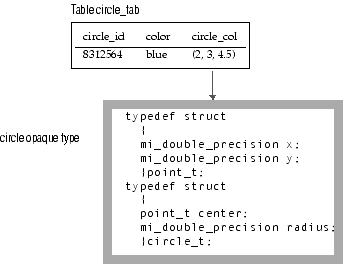
What Does an Opaque Data Type Look Like?The following diagram illustrates an opaque data type called circle, based on a structure called circle_t, in a column called circle_col.
The table circle_tab consists of the columns circle_id(SERIAL), color(VARCHAR(15)), and circle_col(circle). The opaque data type circle is defined as a C structure, circle_t, which contains a radius member and another structure, point_t. The point_t structure contains x and y members. To the database server, however, the whole circle_t structure is indivisible, unless you provide accessor functions.
Why Use an Opaque Data Type?Use an opaque type to extend SQL to address fundamentally new data types and allow operations on them. Such data types are typically indivisible or made up of components to which you want to control access.
For example, geographic data and many sorts of rich media data (images, audio, text, and so on) are have been represented by the use of opaque types. Opaque data types often contain smart large objects. Smart large objects are logically stored in a column in a database table but physically stored in a file. For example, an opaque data type for images could have a smart large object member containing the image and other members containing metadata about the image.
Opaque types require more work to create than other data types because you must write all the routines that support them.
Opaque Data Type Support RoutinesBladeSmith enables you to generate support routine code for opaque data types. You might have to add code to implement the functionality your opaque data type requires.
The following table describes the support routines you can create and indicates the categories of opaque types for which they are recommended.
For a description of creating opaque types and their support routines, see the DataBlade Developers Kit User's Guide or Extending Informix Dynamic Server 2000.
A routine is a stored collection of programming statements that allows you to manipulate data.
A routine can be a function, which returns values, or a procedure, which does not. You can write routines in the Informix Stored Procedure Language (SPL), or in an external language, such as C or Java.
Important: Not all routine options are available for SPL and Java. For more information, see the "DataBlade Developers Kit User's Guide."
Routine overloading, or polymorphism, refers to writing a routine that performs the same task and has the same name as an existing routine-but one that takes a different data type as an argument. When you create opaque, collection, or row types, you can overload existing routines for your new data type. When the overloaded routine is called, your Informix database server determines which variant of the routine to use by examining the argument. BladeSmith creates a template for the overloaded routine; however, you must complete the code to enable the routine to complete the assigned task.
You can overload built-in and operator functions for all data types except built-in data types. You can create user-defined routines for all categories of data types. You can create support routines for all extended data types. You must create support routines for opaque data types (see Opaque Data Type Support Routines).
Built-in functions perform arithmetic and other basic operations when included in SQL statements. Operator functions are built-in functions that are bound to operator symbols: for example, the plus() function is bound to the + operator. Some of the arithmetic functions take a single argument, such as the root() function, which calculates the square root of its argument; others take two arguments, such as the pow() function, which raises one argument to the power of the second.
When you overload a built-in or operator function, you must specify what the function does and what it returns. For example, if you overload the plus() function on a row type, you can choose to:
There are also built-in functions that do not take arguments and that you cannot overload, such as the today() function, which returns the current date and time.
For more information, see the Extending Informix Dynamic Server 2000 manual.
Typically, user-defined routines perform operations specific to the data or application for which they are created and are not based on routines provided with your Informix database server. End users call user-defined routines within SQL statements or through the DataBlade API. BladeSmith has a wizard to help you define the parameters for user-defined routines.
A cast is a rule that converts one data type into another. Casts work in only one direction: from the source data type to the target data type. You can, however, define two casts for the same two data types to support conversion in both directions.
For some data types, you can choose whether the database server or the user controls casting.
Create an implicit cast if you want the database server to automatically convert the source data type.
Create an explicit cast if you want the user to specify the cast within an SQL statement.
If you are creating a cast between two data types that have different internal structures, you must write a cast support function. A straight cast, between two data types that have the same internal structure, does not require a cast support function; however, you can supply one to perform a conversion operation. You typically define straight casts to allow implicit casting from a distinct data type to its source data type (but not from a source data type to the distinct data type based on it).
You can use a built-in type as a source or target data type in a cast, but not as both. Built-in types have system-defined casts between each other that the database server invokes automatically.
A distinct type inherits all the casts of the source type. The database server automatically creates an explicit cast between the distinct type and the source type.
For more information about casting, see the Extending Informix Dynamic Server 2000 manual.
An interface is a way to reference another DataBlade module within your DataBlade module. Using an interface creates a dependency on the DataBlade module that provides the interface. You cannot register a DataBlade module that uses an interface unless the DataBlade module that provides the interface is already installed in the database server.
You can import an interface from another DataBlade module to facilitate development of your module. Similarly, you can build a DataBlade module that provides an interface for other DataBlade modules to use.
For more information, see the DataBlade Developers Kit User's Guide.
You can define error or trace messages for your DataBlade module. An error or trace consists of a unique five-character code, a locale (for translation), and a message. If you are developing a DataBlade module as a commercial product, you must contact Informix to request a prefix for your DataBlade module that you use to create unique error codes and other DataBlade module objects.
To localize your error messages, define multiple messages using the same error code, a different locale, and the message text for that locale. Which message the user sees is controlled by the value of the locale environment variables.
For more information, see the DataBlade Developers Kit User's Guide.
BladeSmith generates unit tests for your opaque data type support routines, user-defined routines, and cast support functions. BladeSmith adds data to test boundary conditions for your data types. Use unit tests while you debug your DataBlade module using Microsoft Visual C++ on Windows NT. Run unit tests with the DBDK Visual C++ Add-In and IfxQuery (see DBDK Visual C++ Add-In and IfxQuery).
For more information, see the DataBlade Developers Kit User's Guide.
BladeSmith generates functional tests for your opaque data type support routines, user-defined routines, and cast support functions. You must supply input data, the expected output data (if applicable), or an error code (if the input data is not valid) in BladeSmith. Run functional tests on UNIX after you finish coding your DataBlade module.
For more information, see the DataBlade Developers Kit User's Guide.
You can include custom SQL statements in your DataBlade module to perform tasks such as creating and dropping user-defined access methods, support tables, or SPL routines. You can include custom SQL statements by typing them in the SQL File wizard or by referencing a file.
You can specify dependencies between objects in your DataBlade module and your custom SQL. These dependencies determine the sequence in which the SQL statements are executed when you register the DataBlade module.
For more information, see the DataBlade Developers Kit User's Guide.
After your customers install a DataBlade module on a database server, they may download any client files included in your DataBlade module to client computers. The types of client files you can package with your DataBlade module include:
Your customers use BladeManager to download the client files to their client computers.
For more information, see the DataBlade Developers Kit User's Guide.