
| Informix Guide to SQL: Reference Environment Variables |
|
|
The following sections discuss the environment variables that Informix products use.
 Important: The descriptions of the following environment variables include the syntax for setting the environment variable in the UNIX environment. For a general description of how to set these environment variables in Windows NT environments, see Setting Environment Variables for Native Windows Applications and Setting Environment Variables for Command-Prompt Utilities.
AC_CONFIG
You can set the AC_CONFIG environment variable to specify the path for the ac_config.std configuration file for the archecker utility. The archecker utility checks the validity and completeness of an ON-Bar storage-space backup. The ac_config.std file contains default archecker configuration parameters.

|
| pathname | is the location of the ac_config.std configuration file in $INFORMIXDIR/etc or %INFORMIXDIR%\etc. |
For information on archecker, see your Backup and Restore Guide.
 ARC_CONFIG
 If you use the ON-Archive archive and tape-management system for your database server, you can set the ARC_CONFIG environment variable to specify the name of a nondefault configuration file.

|
The default configuration file for ON-Archive is config.arc, located in the $INFORMIXDIR/etc directory. When you want to create and use a different configuration file for ON-Archive, set ARC_CONFIG to the name of the file. Dynamic Server looks for the specified file in the directory $INFORMIXDIR/etc.
The ARC_CONFIG environment variable lets you change configuration parameters while preserving the default config.arc file. It lets you create multiple configuration files and select the one you want.
For more information on archiving, see your Archive and Backup Guide.
 ARC_DEFAULT
 If you use the ON-Archive archive and tape-management system for your database server, you can set the ARC_DEFAULT environment variable to indicate where a personal default qualifier file is located.

|
For example, to set the ARC_DEFAULT environment variable to specify the file /usr/jane/arcdefault.janeroe, enter the following command:
For more information on archiving, see your Archive and Backup Guide.
 ARC_KEYPAD
 If you use the ON-Archive archive and tape-management system for your database server, you can set your ARC_KEYPAD environment variable to point to a tctermcap file that is different from the default tctermcap file. The default is the $INFORMIXDIR/etc/tctermcap file, and it contains instructions on how to modify the tctermcap file.
The tctermcap file serves the following purposes for the ON-Archive menu interface:

|
For example, to set the ARC_KEYPAD environment variable to specify the file /usr/jane/tctermcap.janeroe, enter the following command:
For more information on archiving, see your Archive and Backup Guide.
Set the COCKPITSERVICE environment variable to specify a nondefault TCP service for DB/Cockpit.

|
The onprobe server and oncockpit client components of DB/Cockpit communicate with each other through a TCP service. Before you can launch DB/Cockpit, onprobe, or oncockpit, you should define the TCP service and assign it a unique service number. For example:
If you do not specify the service name either with the -service command-line option or in the COCKPITSERVICE environment variable, the default is cockpit.
Set the CPFIRST environment variable to determine the nondefault compilation order for all ESQL/C source files in your programming environment.
When compiling an ESQL/C program, the default order is to run the ESQL/C preprocessor on the program source file and pass the resulting file to the C language preprocessor and compiler. However, you can compile an ESQL/C program source file in the following order:
To determine the nondefault compilation order for a specific program, you can either give the program source file a .ecp extension, run the -cp option with the esql command on a program source file with a .ec extension, or set CPFIRST.
Set the CPFIRST environment variable to TRUE (uppercase only) to run the C preprocessor on all ESQL/C source files. The C preprocessor will run before the ESQL/C preprocessor on all ESQL/C source files in your environment, irrespective of whether the -cp option is passed to the esql command or the source files have the .ec or the .ecp extension.

|
The DBACCNOIGN environment variable affects the behavior of the DB-Access utility if an error occurs under one of the following circumstances:
 You execute the LOAD command with DB-Access in menu mode.

Set the DBACCNOIGN environment variable to 1 to roll back an incomplete transaction if an error occurs while you run the DB-Access utility under either of the preceding conditions.

|
For example, assume DB-Access runs the following SQL commands:
In this example, one statement has a misspelled table name. The receipt table does not exist.
If your environment does not have DBACCNOIGN set, DB-Access inserts two records into the receipts table and updates the customer table. The decrease in the customer balance exceeds the sum of the inserted receipts.
If DBACCNOIGN is set to 1, messages display to indicate that DB-Access rolled back all the INSERT and UPDATE statements. The messages also identify the cause of the error so that you can resolve the problem.
 Load Statement Example
You can set DBACCNOIGN to protect data integrity during a LOAD statement, even if DB-Access runs the LOAD statement in menu mode.
Assume you execute the LOAD statement from the DB-Access SQL menu page. Forty-nine rows of data load correctly, but the fiftieth row contains an invalid value that causes an error.
If you set DBACCNOIGN to 1, the database server does not insert the forty-nine previous rows into the database. If DBACCNOIGN is not set, the database server inserts the first forty-nine rows.
Setting the DBANSIWARN environment variable indicates that you want to check for Informix extensions to ANSI standard syntax. Unlike most environment variables, you do not need to set DBANSIWARN to a value. You can set it to any value or to no value.

|
If you set the DBANSIWARN environment variable for DB-Access, it is functionally equivalent to including the -ansi flag when you invoke the utility from the command line. If you set DBANSIWARN before you run DB-Access, warnings are displayed on the screen within the SQL menu.
Set the DBANSIWARN environment variable before you compile an Informix ESQL/C program to check for Informix extensions to ANSI standard syntax. When Informix extensions to ANSI standard syntax are encountered in your program at compile time, warning messages are written to the screen.
At run time, the DBANSIWARN environment variable causes the sixth character of the sqlwarn array in the SQL Communication Area (SQLCA) to be set to W when a statement is executed that includes any Informix extension to the ANSI standard for SQL syntax. (For more information on SQLCA, see the Informix ESQL/C Programmer's Manual.
After you set DBANSIWARN, Informix extension checking is automatic until you log out or unset DBANSIWARN. To turn off Informix extension checking, unset the DBANSIWARN environment variable by entering the following command:
The DBBLOBBUF environment variable controls whether TEXT or BYTE data is stored temporarily in memory or in a file while being unloaded with the UNLOAD statement.

|
n | represents the maximum size of TEXT or BYTE data in kilobytes. |
If TEXT or BYTE (simple large object) data is smaller than the default of 10 kilobytes or the setting of the DBBLOBBUF environment variable, it is temporarily stored in memory. If the TEXT or BYTE data is larger than the default or the setting of the environment variable, it is written to a temporary file. This environment variable applies to the UNLOAD command only.
For instance, to set a buffer size of 15 kilobytes, set the DBBLOBBUF environment variable as the following example shows:
In the example, any TEXT or BYTE data that is smaller than 15 kilobytes is stored temporarily in memory. TEXT or BYTE data larger than 15 kilobytes is stored temporarily in a file.
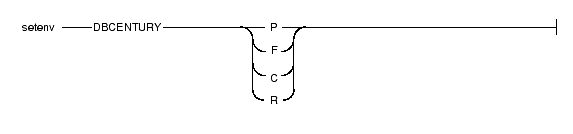
The DBCENTURY environment variable lets you choose the appropriate expansion for DATE and DATETIME values that have only a one- or two-digit year, such as 4/15/3 or 04/15/99.
|
By default, if only the decade is provided for a literal DATE or DATETIME value in a table column, the current century is used to expand the year. For example, if today's date is 09/30/1999, the date 12/31/99 expands to 12/31/1999, and 12/31/00 expands to 12/31/1900. DBCENTURY algorithms let you determine the century value of a year (the desired expansion of a two-digit year).
When the DBCENTURY environment variable is not set or is set to R, the two high-order digits of the current year in its four-digit form are used to expand the year value. To override the default, specify all four digits.
 Tip: Setting DBCENTURY does not affect Informix products when the locale specifies a non-Gregorian calendar such as Hebrew or Islamic. A default century is used for alternate calendar systems when the century is not specified.
Examples of How the DBCENTURY Environment Variable Expands Date Values
The following examples illustrate how the DBCENTURY environment variable expands DATE and DATETIME year formats.
Important: The interpretation of the variables P, F, and C will always vary with the current date. In the first example, 1/1/1 will be expanded as 1/1/2001 if the current date is 4/6/2001 and DBCENTURY = P. In the second example, 1/1 will be expanded as 2001/1 if the current date is 5/7/1995 and DBCENTURY = F.
Behavior of DBCENTURY with Expressions that Contain Date Values
This section describes how the database server uses the DBCENTURY environment variable to interpret dates in fragmentation expressions, triggers, check constraints, and UDRs.
When an expression (check constraint, fragmentation expression, trigger, or UDR) contains a date value in which the year has 1 or 2 digits, the database server uses the setting of DBCENTURY at the time the database object (table, trigger, or UDR) is created. The setting of DBCENTURY at creation time is used to expand date values during execution of UDRs and triggers and during evaluation of date values within check constraints and fragment expressions.
For example, suppose a user creates a table and defines the following check constraint on a column named birthdate:
The preceding expression is interpreted according to the value of DBCENTURY when the constraint is defined. If the table that contains the birthdate column is created on 06/29/98 and DBCENTURY=C, the check constraint expression is consistently interpreted as birthdate < '01/25/1950' regardless of the value of DBCENTURY when inserts or updates are performed on the birthdate column. In other words, even if different values of DBCENTURY are set when users perform inserts or updates on the birthdate column, the check constraint expression is interpreted according to the DBCENTURY setting at the time the check constraint is defined.
The value of DBCENTURY and the current date are not the only factors that determine how the database server interprets a date expression. The DBDATE, DBTIME, GL_DATE, and GL_DATETIME environment variables also influence how dates are interpreted. For information about GL_DATE and GL_DATETIME, see the Informix Guide to GLS Functionality.
Important: The behavior of DBCENTURY for Dynamic Server and Enterprise Decision Server is not backwards compatible.
DBDATE
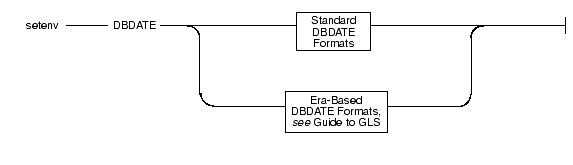
The DBDATE environment variable specifies the end-user formats of DATE values. End-user formats affect the following situations:
|
This section describes standard DBDATE formats.
 For a description of era-based formats, see the Informix Guide to GLS Functionality.

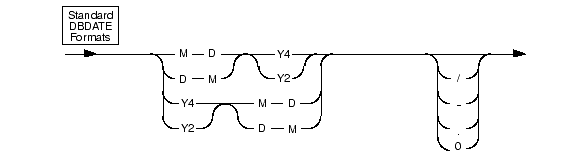
With standard formats, you can specify the following attributes:
|
For the U.S. ASCII English locale, the default setting for DBDATE is MDY4/, where M represents the month, D represents the day, Y4 represents a four-digit year, and slash (/) is a separator (for example, 01/08/1999).
Other acceptable characters for the separator are a hyphen (-), a period (.), or a zero (0). To indicate no separator, use the zero.
The slash (/) appears if you attempt to use a character other than a hyphen, period, or zero as a separator, or if you do not include a separator character in the DBDATE definition.
The following table shows some variations for setting the DBDATE environment variable.
| Variation | January 8, 1999, appears as: |
|---|---|
| MDY4/ | 01/08/1999 |
| DMY2- | 08-01-99 |
| MDY4 | 01/08/1999 |
| Y2DM. | 99.08.01 |
| MDY20 | 010899 |
| Y4MD* | 1999/01/08 |
The formats Y4MD* (the asterisk is an unacceptable separator) and MDY4 (no separator is defined) both display the default (slash) as a separator.
Important: If you use the Y2 format, the setting of the DBCENTURY environment variable affects how the DATE values are expanded.
Also, certain routines that Informix ESQL/C calls can use the DBTIME variable, rather than DBDATE, to set DATETIME formats to international specifications. For more information, see the discussion of the DBTIME environment variable on page 3-54 and the "Informix ESQL/C Programmer's Manual."
 The setting of the DBDATE variable takes precedence over that of the GL_DATE environment variable, as well as over the default DATE formats that CLIENT_LOCALE specifies. For information about the GL_DATE and CLIENT_LOCALE environment variables, see the Informix Guide to GLS Functionality.
This section describes how the database server uses the DBDATE environment variable to interpret date values in UDRs, triggers, fragmentation expressions, and check constraints.
When an expression (UDR, trigger, check constraint, or fragmentation expression) contains a date value, the database server uses the setting of DBDATE at the time the database object (UDR, trigger, or table) is created. The value of DBDATE at creation time determines the format for date values during execution of UDRs and triggers and during evaluation of date values within check constraints and fragment expressions.
Suppose DBDATE is set to MDY2/ and a user creates a table with the following check constraint on the column orderdate:
The date of the preceding expression is formatted according to the value of DBDATE when the constraint is defined. The check constraint expression is interpreted as orderdate < '06/25/98' regardless of the value of DBDATE during inserts or updates on the orderdate column. Suppose DBDATE is set to DMY2/ when a user inserts the value'30/01/98' into the orderdate column. The date value inserted uses the date format DMY2/, whereas the check constraint expression uses the date format MDY2/.
Important: The behavior of DBDATE for Dynamic Server and Enterprise Decision Server is not backwards compatible.
DBDELIMITER
The DBDELIMITER environment variable specifies the field delimiter used by the dbexport utility and with the LOAD and UNLOAD statements.

|
The delimiter can be any single character, except the characters in the following list:
The vertical bar (|=ASCII 124) is the default. To change the field delimiter to a plus (+), set the DBDELIMITER environment variable, as the following example shows:
The DBEDIT environment variable lets you name the text editor that you want to use to work with SQL statements and command files in DB-Access. If DBEDIT is set, the specified text editor is called directly. If DBEDIT is not set, you are prompted to specify a text editor as the default for the rest of the session.

|
For most systems, the default text editor is vi. If you use another text editor, be sure that it creates flat ASCII files. Some word processors in document mode introduce printer control characters that can interfere with the operation of your Informix product.
To specify the EMACS text editor, set the DBEDIT environment variable by entering the following command:
The DB-Access utility displays the floating-point values of data types FLOAT, SMALLFLOAT, and DECIMAL within a 14-character buffer. By default, DB-Access displays as many digits to the right of the decimal point as will fit into this character buffer. Therefore, the actual number of decimal digits that DB-Access displays depends on the size of the floating-point value.
To reduce the number of digits that display to the right of the decimal point for floating-point values, you can set the DBFLTMASK environment variable to the number of digits desired.

|
| n | is the number of decimal digits that you want the Informix client application to display in the floating-point values. n must be smaller than 16, the default number of digits displayed. |
If the floating-point value contains more digits to the right of the decimal than DBFLTMASK specifies, DB-Access rounds the value to the specified number of digits. If the floating-point value contains fewer digits to the right of the decimal, DB-Access pads the value with zeros. However, if you set DBFLTMASK to a value greater than can fit into the 14-character buffer, DB-Access rounds the value to the number of digits that can fit.
The DBLANG environment variable specifies the subdirectory of $INFORMIXDIR or the full pathname of the directory that contains the compiled message files that an Informix product uses.

|
| relative_path | is the subdirectory of $INFORMIXDIR. |
| full_path | is the full pathname of the directory that contains the compiled message files. |
By default, Informix products put compiled messages in a locale-specific subdirectory of the $INFORMIXDIR/msg directory. These compiled message files have the suffix .iem. If you want to use a message directory other than $INFORMIXDIR/msg, where, for example, you can store message files that you create, perform the following steps:
Informix products that use the default U.S. ASCII English search for message files in the following order:
 For more information on access paths for messages, see the description of DBLANG in the Informix Guide to GLS Functionality.
The DBMONEY environment variable specifies the display format of monetary values with FLOAT, DECIMAL, or MONEY data types.

|
If you use any character except an alphabetic character for front or back, you must enclose the character in quotes.
When you display MONEY values, Informix products use the DBMONEY environment variable to format the output.
Tip: The setting of DBMONEY does not affect the internal format of the MONEY column in the database.
If you do not set DBMONEY, then MONEY values for the default locale, U.S. ASCII English, are formatted with a dollar sign ($) that precedes the MONEY value, a period (.) that separates the integral from the fractional part of the MONEY value, and no back symbol. For example, 10050 is formatted as $100.50.
Suppose you want to represent MONEY values in DM (Deutsche Mark), which uses the currency symbol DM and a comma. Enter the following command to set the DBMONEY environment variable:
Here, DM is the currency symbol that precedes the MONEY value, and a comma separates the integral from the fractional part of the MONEY value. As a result, the amount 10050 is displayed as DM100,50.
 For more information about how the DBMONEY environment variable handles MONEY formats for nondefault locales, see the Informix Guide to GLS Functionality.
 DBONPLOAD
The DBONPLOAD environment variable specifies the name of the database that the onpload utility of the High-Performance Loader (HPL) uses. If the DBONPLOAD environment variable is set, the specified name is the name of the database. If the DBONPLOAD environment variable is not set, the default name of the database is onpload.

|
For example, to specify the name load_db as the name of the database, enter the following command:
For more information, see the Guide to the High-Performance Loader.
Use DBPATH to identify the database servers that contain databases. The DBPATH environment variable also specifies a list of directories (in addition to the current directory) in which DB-Access looks for command scripts (.sql files).
The CONNECT, DATABASE, START DATABASE, and DROP DATABASE statements use DBPATH to locate the database under two conditions:
The CREATE DATABASE statement does not use DBPATH.
To add a new DBPATH entry to existing entries, see Modifying an Environment-Variable Setting.

|
| servername | is the name of an Informix database server on which databases are stored. You cannot reference database files with a servername. |
DBPATH can contain up to 16 entries. Each entry (full_pathname, servername, or servername and full_pathname) must be less than 128 characters. In addition, the maximum length of DBPATH depends on the hardware platform on which you set DBPATH.
When you access a database with the CONNECT, DATABASE, START DATABASE, or DROP DATABASE statement, the search for the database is done first in the directory and/or database server specified in the statement. If no database server is specified, the default database server as set in the INFORMIXSERVER environment variable is used.
If the database is not located during the initial search, and if DBPATH is set, the database servers and/or directories in DBPATH are searched for in the indicated database. The entries to DBPATH are considered in order.
If you use DB-Access and select the Choose option from the SQL menu without having already selected a database, you see a list of all the .sql files in the directories listed in your DBPATH. Once you select a database, the DBPATH is not used to find the .sql files. Only the .sql files in the current working directory are displayed.
Use a pathname without a database server name to have the database server search for .sql scripts on your local computer.
In the following example, the DBPATH setting causes DB-Access to search for the database files in your current directory and then in Joachim's and Sonja's directories on the local computer:
As the previous example shows, if the pathname specifies a directory name but not a database server name, the directory is sought on the computer that runs the default database server that the INFORMIXSERVER environment variable specifies (see page 3-71). For instance, with the previous example, if INFORMIXSERVER is set to quality, the DBPATH value is interpreted, as the following example shows, where the double slash precedes the database server name:
If you use more than one database server, you can set DBPATH to explicitly contain the database server and/or directory names that you want to search for databases. For example, if INFORMIXSERVER is set to quality but you also want to search the marketing database server for /usr/joachim, set DBPATH as the following example shows:
You can set DBPATH to contain only database server names. This setting allows you to locate only databases and not locate command files.
The database administrator must include each database server mentioned by DBPATH in the $INFORMIXDIR/etc/sqlhosts file. For information on communication-configuration files and dbservernames, see your Administrator's Guide and the Administrator's Reference.
For example, if INFORMIXSERVER is set to quality, you can search for a database first on the quality database server and then on the marketing database server by setting DBPATH as the following example shows:
If you use DB-Access in this example, the names of all the databases on the quality and marketing database servers are displayed with the Select option of the DATABASE menu.
 DBPRINT
The DBPRINT environment variable specifies the printing program that you want to use.

|
The default program is found in one of two places:
Enter the following command to set the DBPRINT environment variable to specify the myprint print program:
 DBREMOTECMD
You can set the DBREMOTECMD environment variable to override the default remote shell used when you perform remote tape operations with the database server.
You can set the dbremotecmd environment variable with either a simple command or the full pathname. If you use the full pathname, the database server searches your PATH for the specified command.

|
| command | is the command to override the default remote shell. |
| pathname | is the pathname to override the default remote shell. |
Informix highly recommends the use of the full pathname syntax on the interactive UNIX platform to avoid problems with similarly named programs in other directories and possible confusion with the restricted shell (/usr/bin/rsh).
Enter the following command to set the DBREMOTECMD environment variable for a simple command name:
Enter the following command to set the DBREMOTECMD environment variable to specify the full pathname:
For more information on DBREMOTECMD, see the discussion in your Archive and Backup Guide about how to use remote tape devices with your database server for archives, restores, and logical-log backups.
You can set your DBSPACETEMP environment variable to specify the dbspaces in which temporary tables are to be built. You can specify multiple dbspaces to spread temporary space across any number of disks.

|
The DBSPACETEMP environment variable overrides the default dbspaces that the DBSPACETEMP configuration parameter specifies in the configuration file for your database server.
Important: The dbspaces that you list in DBSPACETEMP must be composed of chunks that are allocated as raw UNIX devices.
For example, you might set the DBSPACETEMP environment variable with the following command:
Separate the dbspace entries with either colons or commas. The number of dbspaces is limited by the maximum size of the environment variable, as defined by your operating system. Your database server does not create a dbspace specified by the environment variable if the dbspace does not exist.
The two classes of temporary tables are explicit temporary tables that the user creates and implicit temporary tables that the database server creates. Use the DBSPACETEMP environment variable to specify the dbspaces for both types of temporary tables.
If you create an explicit temporary table with the CREATE TEMP TABLE statement and do not specify a dbspace for the table either in the IN dbspace clause or in the FRAGMENT BY clause, the database server uses the settings in the DBSPACETEMP environment variable to determine where to create the table.
If you create an explicit temporary table with the SELECT INTO TEMP statement, the database server uses the settings in the DBSPACETEMP environment variable to determine where to create the table. If the DBSPACETEMP environment variable is not set, the database server uses the ONCONFIG parameter DBSPACETEMP. If this parameter is not set, the database server creates the explicit temporary table in the same dbspace where the database resides.
The database server creates implicit temporary tables for its own use while executing join operations, SELECT statements with the GROUP BY clause, SELECT statements with the ORDER BY clause, and index builds. When it creates these implicit temporary tables, the database server uses disk space for writing the temporary data, in the following order:
 The operating-system directory or directories that the environment variable PSORT_DBTEMP specifies, if it is set.
If the DBSPACETEMP environment variable is set to a nonexistent dbspace, the database server defaults to the root dbspace for explicit temporary tables and to /tmp for implicit temporary tables, not to the DBSPACETEMP configuration parameter.
Important: If the DBSPACETEMP environment variable is set to an invalid value, the database server might fill /tmp to the limit and eventually bring down the system or kill the file system.
DBTEMP
Set the DBTEMP environment variable to specify the full pathname of the directory into which you want Informix Enterprise Gateway products to place their temporary files and temporary tables.

|
pathname | is the full pathname of the directory for temporary files and temporary tables. |
Set the DBTEMP environment variable to specify the pathname usr/magda/mytemp by entering the following command:
Important: DBTEMP must not point to an NFS directory.
If you do not set DBTEMP, temporary files are created in /tmp. If DBTEMP is not set, temporary tables are created in the directory of the database (that is, the .dbs directory). For more information, see your INFORMIX-Enterprise Gateway User Manual.
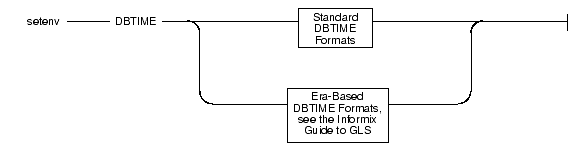
The DBTIME environment variable specifies the end-user formats of DATETIME values for a set of SQL API library functions.
|
You can set the DBTIME environment variable to manipulate DATETIME formats so that the formats conform more closely to various international or local TIME conventions. DBTIME takes effect only when you call certain Informix ESQL/C DATETIME routines; otherwise, use the DBDATE environment variable. (For details, see the Informix ESQL/C Programmer's Manual.)
You can set DBTIME to specify the exact format of an input/output (I/O) DATETIME string field with the formatting directives described in the following list. Otherwise, the behavior of the DATETIME formatting routine is undefined.

|
For example, consider how to convert a DATETIME YEAR TO SECOND to the following ASCII string format:
Set DBTIME as the following list shows:
The default DBTIME produces the conventional ANSI SQL string format that the following line shows:
Set the default DBTIME as the following example shows:
An optional field width and precision specification can immediately follow the percent (%) character; it is interpreted as the following list describes:
where w is a decimal digit string specifying the minimum field width. By default, the value is right justified with spaces on the left. | |
If - is specified, it is left justified with spaces on the right. | |
If 0 is specified, it is right justified and padded with zeros on the left. | |
where p is a decimal digit string specifying the number of digits to appear for d, H, I, m, M, S, y, and Y conversions, and the maximum number of characters to be used for b and B conversions. A precision specification is significant only when converting a DATETIME value to an ASCII string and not vice versa. |
When you use field width and precision specifications, the following limitations apply:
The F conversion does not follow the field width and precision format conversions that are described earlier.
For related information, see the discussion of DBDATE on page 3-37.
 For more information about how the DBTIME environment variable handles time formats for nondefault locales, see the Informix Guide to GLS Functionality.
The DBUPSPACE environment variable lets you specify and constrain the amount of system disk space that the UPDATE STATISTICS statement can use when trying to simultaneously construct multiple column distributions.

|
value | represents a disk space amount in kilobytes. |
For example, to set DBUPSPACE to 2,500 kilobytes, enter the following command:
Once you set this value, the database server can use no more than 2,500 kilobytes of disk space during the execution of an UPDATE STATISTICS statement. If a table requires 5 megabytes of disk space for sorting, then UPDATE STATISTICS accomplishes the task in two passes; the distributions for one half of the columns are constructed with each pass.
If you try to set DBUPSPACE to any value less than 1,024 kilobytes, it is automatically set to 1,024 kilobytes, but no error message is returned. If this value is not large enough to allow more than one distribution to be constructed at a time, at least one distribution is done, even if the amount of disk space required for the one is greater than specified in DBUPSPACE.
The DELIMIDENT environment variable specifies that strings set off by double quotes are delimited identifiers.

|
You can use delimited identifiers to specify identifiers that are identical to reserved keywords, such as TABLE or USAGE. You can also use them to specify database identifiers that contain nonalpha characters, but you cannot use them to specify storage identifiers that contain nonalpha characters. Database identifiers are names for database objects such as tables and columns, and storage identifiers are names for storage objects such as dbspaces and partition simple large objects.
Delimited identifiers are case sensitive.
To use delimited identifiers, applications in ESQL/Cmust set the DELIMIDENT environment variable at compile time and execute time.
 ENVIGNORE
Use the ENVIGNORE environment variable to deactivate specified environment variable entries in the common (shared) and private environment-configuration files, informix.rc and .informix respectively.

|
For example, to ignore the DBPATH and DBMONEY entries in the environment-configuration files, enter the following command:
The common environment-configuration file is stored in $INFORMIXDIR/etc/informix.rc. The private environment-configuration file is stored in the user's home directory as .informix. For information on creating or modifying an environment-configuration file, see Setting Environment Variables in an Environment-Configuration File.
ENVIGNORE cannot be set in an environment-configuration file.
The FET_BUF_SIZE environment variable lets you override the default setting for the size of the fetch buffer for all data except simple large objects. When set, FET_BUF_SIZE is effective for the entire environment.

|
n | represents the size of the buffer in bytes. |
When set to a valid value, the environment variable overrides the previously set value. The default setting for the fetch buffer is dependent on row size.
If the buffer size is set to less than the default size or is out of the range of the small integer value, no error is raised. The new buffer size is ignored.
For example, to set a buffer size to 5,000 bytes, set the FET_BUF_SIZE environment variable by entering the following command:
 IFMX_SMLTBL_BROADCAST_SIZE
The IFMX_SMLTBL_BROADCAST_SIZE environment variable setting determines the threshold size of tables that are used in Small Table Broadcast when the table size exceeds 128 kilobytes. The IFMX_SMLTBL_BROADCAST_SIZE environment variable is set on the database server.

|
n | represents the size of the table in kilobytes. |
Important: Query performance can suffer if the IFMX_SMLTBL_BROADCAST environment variable is set beyond a certain table size. The recommended upper limit on table size depends on your computer and the configuration of your database server.
For more information about the IFMX_SMLTBL_BROADCAST environment variable, see your documentation notes or release notes.
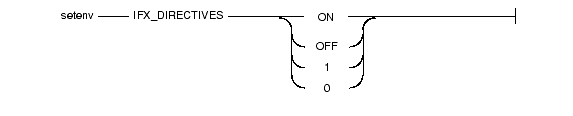
 IFX_DIRECTIVES
The IFX_DIRECTIVES environment variable setting determines whether the optimizer allows query optimization directives from within a query. The IFX_DIRECTIVES environment variable is set on the client.
You can use either ON and OFF or 1 and 0 to set the environment variable.
|
| ON | Optimizer directives accepted |
| OFF | Optimizer directives not accepted |
| 1 | Optimizer directives accepted |
| 0 | Optimizer directives not accepted |
The setting of the IFX_DIRECTIVES environment variable overrides the value of the DIRECTIVES configuration parameter that is set for the database server. If the IFX_DIRECTIVES environment variable is not set, however, then all client sessions will inherit the database server configuration for directives that the ONCONFIG parameter DIRECTIVES determines. The default setting for the DIRECTIVES parameter is ON.
For more information about the DIRECTIVES parameter, see the Administrator's Reference. For more information on the performance impact of directives, see your Performance Guide.
 IFX_LONGID
Use the IFX_LONGID environment variable setting and the version number of the client application to determine whether a particular client application is capable of handling long identifiers. Valid IFX_LONGID values are 1 and 0.

|
If IFX_LONGID is unset or is set to a value other than 1 or 0, the determination is based on the internal version of the client application. If the version is >= 9.0304, the client is considered new and thus capable of handling long identifiers. Otherwise, the client application is considered incapable.
The IFX_LONGID setting overrides the internal version of the client application. If the client cannot handle long identifiers despite a newer version number, set IFX_LONGID to 0. If the client version can handle long identifiers despite an older version number, set IFX_LONGID to 1.
If you set the IFX_LONGID environment variable at the client, the setting affects only that client. If you bring up the database server with IFX_LONGID set, all client applications will adhere to that setting. If IFX_LONGID is set at both the client and the database server, the client setting takes precedence.
Important: ESQL executables that have been built with the -static option using the libos.a library version that does not support long identifiers cannot use the IFX_LONGID environment variable. You must recompile such applications with the new libos.a library that includes support for long identifiers. Executables that use shared libraries (no -static option) can use IFX_LONGID without recompilation provided that they use the new libifos.so that provides support for long identifiers. For details, see your ESQL product manual.
 IFX_NETBUF_PVTPOOL_SIZE
The IFX_NETBUF_PVTPOOL_SIZE environment variable specifies the maximum size of the free (unused) private network buffer pool for each database server session.

|
n | represents the number of units (buffers) in the pool. |
The default size is 1 buffer. If IFX_NETBUF_PVTPOOL_SIZE is set to 0, each session obtains buffers from the free global network buffer pool. You must specify the value in decimal form.
The IFX_NETBUF_SIZE environment variable lets you configure the network buffers to the optimum size. It specifies the size of all network buffers in the free (unused) global pool and the private network buffer pool for each database server session.

|
n | represents the size (in bytes) for one network buffer. |
The default size is 4 kilobytes (4,096 bytes). The maximum size is 64 kilobytes (65,536 bytes) and the minimum size is 512 bytes. You can specify the value in hexadecimal or decimal form.
Tip: You cannot set a different size for each session.
 IFX_UPDDESC
The IFX_UPDDESC environment variable controls the use of the describe-for-updates functionality. You must set IFX_UPDDESC at execution time before you do a DESCRIBE of an UPDATE statement.

|
You can set IFX_UPDDESC to any value. A null value (the environment variable is not set) indicates that the feature is not being used. Any nonnull value indicates that the feature is enabled.
 INFORMIXC
The INFORMIXC environment variable specifies the name or pathname of the C compiler to be used to compile files that Informix ESQL/C generates.
If INFORMIXC is not set, the default compiler is cc.
Tip: On Windows NT, you pass either -mcc or -bcc options to the esql preprocessor to use either the Microsoft or Borland C compilers.

|
compiler | is the name of the C compiler. |
pathname | is the full pathname of the C compiler. |
The setting is required only during the C compilation stage.
 INFORMIXCONCSMCFG
The INFORMIXCONCSMCFG environment variable specifies the location of the concsm.cfg file that describes communications support modules.

|
pathname | specifies the full pathname of the concsm.cfg file. |
The following sample command specifies that the concsm.cfg file is in /usr/myfiles:
You can also specify a different name for the file. The following example specifies a filename of csmconfig:
The default location of the concsm.cfg file is in $INFORMIXDIR/etc. For more information about communications support modules and the contents of the concsm.cfg file, refer to the Administrator's Reference.
The INFORMIXCONRETRY environment variable specifies the maximum number of additional connection attempts that should be made to each server by the client during the time limit that the INFORMIXCONTIME environment variable specifies.

|
value | represents the number of connection attempts to each server. |
For example, enter the following command to set INFORMIXCONRETRY to three additional connection attempts (after the initial attempt):
The default value for INFORMIXCONRETRY is one retry after the initial connection attempt. The INFORMIXCONTIME setting, described in the following section, takes precedence over the INFORMIXCONRETRY setting.
The INFORMIXCONTIME environment variable lets you specify that an SQL CONNECT statement should keep trying for at least the given number of seconds before returning an error.
You might encounter connection difficulties related to system or network load problems. For instance, if the database server is busy establishing new SQL client threads, some clients might fail because the database server cannot issue a network function call fast enough. The INFORMIXCONTIME and INFORMIXCONRETRY environment variables let you configure your client-side connection capability to retry the connection instead of returning an error.

|
value | represents the minimum number of seconds spent in attempts to establish a connection to a database server. |
For example, enter the following command to set INFORMIXCONTIME to 60 seconds:
If INFORMIXCONTIME is set to 60 and INFORMIXCONRETRY is set to 3, attempts to connect to the database server (after the initial attempt at 0 seconds) are made at 20, 40, and 60 seconds, if necessary, before aborting. This 20-second interval is the result of INFORMIXCONTIME divided by INFORMIXCONRETRY.
If execution of the CONNECT statement involves searching DBPATH, the following rules apply:
The default value for INFORMIXCONTIME is 15 seconds. The setting for INFORMIXCONTIME takes precedence over the INFORMIXCONRETRY setting. Retry efforts could end after the INFORMIXCONTIME value is exceeded but before the INFORMIXCONRETRY value is reached.
 INFORMIXCPPMAP
Set the INFORMIXCPPMAP environment variable to specify the fully qualified pathname of the map file for C++ programs. Information in the map file includes the database server type, the name of the shared library that supports the database object or value object type, the library entry point for the object, and the C++ library for which an object was built.

|
pathname | is the directory path where the C++ map file is stored. |
The map file is a text file that can have any file name. The INFORMIXCPPMAP setting can include several map files separated by colons (:) on UNIX or semicolons (;) on Windows NT. On UNIX, the default map file is $INFORMIXDIR/etc/c++map. On Windows NT, the default map file is %INFORMIXDIR%\etc\c++map.
The INFORMIXDIR environment variable specifies the directory that contains the subdirectories in which your product files are installed. You must always set the INFORMIXDIR environment variable. Verify that the INFORMIXDIR environment variable is set to the full pathname of the directory in which you installed your database server. If you have multiple versions of a database server, set INFORMIXDIR to the appropriate directory name for the version that you want to access. For information about when to set the INFORMIXDIR environment variable, see your Installation Guide.

|
pathname | is the directory path where the product files are installed. |
To set the INFORMIXDIR environment variable to the desired installation directory, enter the following command:
 INFORMIXKEYTAB
The INFORMIXKEYTAB environment variable specifies the location of the keytab file. The keytab file contains authentication information that database servers and clients access at connection time, if they use the DCE-GSS communications support module (CSM). It contains key tables that store keys, each of which contains a principal name (database server or user name), type, version, and value.
The database server uses the keytab file to find the key to register the server and to acquire a credential for it. A client application uses the key if the user did not do dce_login with the current operating-system user name (which is the same as the DCE principle name) or did not explicitly provide a credential.

|
pathname | specifies the full path of the keytab file. |
For example, the following command specifies that the name and location of the keytab file is /usr/myfiles/mykeytab:
For more information about the DCE-GSS communications support module, see the Administrator's Guide.
 INFORMIXOPCACHE
The INFORMIXOPCACHE environment variable lets you specify the size of the memory cache for the staging-area blobspace of the client application.

|
kilobytes | specifies the value you set for the optical memory cache. |
Set the INFORMIXOPCACHE environment variable by specifying the size of the memory cache in kilobytes. The specified size must be equal to or smaller than the size of the system-wide configuration parameter, OPCACHEMAX.
If you do not set the INFORMIXOPCACHE environment variable, the default cache size is 128 kilobytes or the size specified in the configuration parameter OPCACHEMAX. The default for OPCACHEMAX is 128 kilobytes. If you set INFORMIXOPCACHE to a value of 0, Optical Subsystem does not use the cache.
The INFORMIXSERVER environment variable specifies the default database server to which an explicit or implicit connection is made by an SQL API client or the DB-Access utility.
The database server can be either local or remote. You must always set INFORMIXSERVER before you use an Informix product.

|
dbservername | is the name of the default database server. |
The value of INFORMIXSERVER must correspond to a valid dbservername entry in the $INFORMIXDIR/etc/sqlhosts file on the computer running the application. The dbservername must be specified using lowercase characters and cannot exceed 128 characters. For example, to specify the coral database server as the default for connection, enter the following command:
INFORMIXSERVER specifies the database server to which an application connects if the CONNECT DEFAULT statement is executed. It also defines the database server to which an initial implicit connection is established if the first statement in an application is not a CONNECT statement.
 Important: You must set INFORMIXSERVER even if the application or DB-Access does not use implicit or explicit default connections.
 For Enterprise Decision Server, the INFORMIXSERVER environment variable specifies the name of a dbserver group. To specify a coserver name, use the following format:
In the coserver name, dbservername is the value that you assigned to the DBSERVERNAME configuration parameter when you prepared the ONCONFIG configuration file, and coserver_number is the value that you assigned to the COSERVER configuration parameter for the connection coserver.
Strictly speaking, INFORMIXSERVER is not required for initialization. However, if INFORMIXSERVER is not set, Enterprise Decision Server does not build the sysmaster tables.
 INFORMIXSHMBASE
The INFORMIXSHMBASE environment variable affects only client applications connected to Informix databases that use the interprocess communications (IPC) shared-memory (ipcshm) protocol.
 Important: Resetting INFORMIXSHMBASE requires a thorough understanding of how the application uses memory. Normally you do not reset INFORMIXSHMBASE.
Use INFORMIXSHMBASE to specify where shared-memory communication segments are attached to the client process so that client applications can avoid collisions with other memory segments that the application uses. If you do not set INFORMIXSHMBASE, the memory address of the communication segments defaults to an implementation-specific value such as 0x800000.

|
value | is used to calculate the memory address. |
The database server calculates the memory address where segments are attached by multiplying the value of INFORMIXSHMBASE by 1,024. For example, to set the memory address to the value 0x800000, set the INFORMIXSHMBASE environment variable by entering the following command:
For more information, see your Administrator's Guide and the Administrator's Reference.
The INFORMIXSQLHOSTS environment variable specifies the full pathname to the place where client-database server connectivity information is stored. On UNIX, by default, this environment variable points to the $INFORMIXDIR/etc/sqlhosts file. For example, to specify that the client or database server will look for connectivity information in the mysqlhosts file in the /work/envt directory, enter the following command:
When the INFORMIXSQLHOSTS environment variable is set, the client or database server looks in the specified file for connectivity information. When the INFORMIXSQLHOSTS environment variable is not set, the client or database server looks in the $INFORMIXDIR/etc/sqlhosts file.

|
pathname | specifies the full pathname and filename of the file that contains connectivity information. |
On Windows NT, by default, this environment variable points to the computer whose registry contains the SQLHOSTS subkey. To specify that the client or database server look for connectivity information on a computer named arizona, enter the following command:
For a description of the SqlHosts information, see your Administrator's Guide.
INFORMIXSTACKSIZE specifies the stack size (in kilobytes) that the database server uses for a particular client session.
Use INFORMIXSTACKSIZE to override the value of the ONCONFIG parameter STACKSIZE for a particular application or user.

|
value | is the stack size for SQL client threads in kilobytes. |
For example, to decrease the INFORMIXSTACKSIZE to 20 kilobytes, enter the following command:
If INFORMIXSTACKSIZE is not set, the stack size is taken from the database server configuration parameter STACKSIZE, or it defaults to a platform-specific value. The default stack size value for the primary thread for an SQL client is 32 kilobytes for nonrecursive database activity.
 Warning: For specific instructions on setting this value, see the "Administrator's Reference." If you incorrectly set the value of INFORMIXSTACKSIZE, it can cause the database server to fail.
 INFORMIXTERM
The INFORMIXTERM environment variable specifies whether DB-Access should use the information in the termcap file or the terminfo directory.
The termcap file and terminfo directory determine terminal-dependent keyboard and screen capabilities, such as the operation of function keys, color and intensity attributes in screen displays, and the definition of window borders and graphic characters.

|
If INFORMIXTERM is not set, the default setting is termcap. When DB-Access is installed on your system, a termcap file is placed in the etc subdirectory of $INFORMIXDIR. This file is a superset of an operating-system termcap file.
You can use the termcap file that Informix supplies, the system termcap file, or a termcap file that you create. You must set the TERMCAP environment variable if you do not use the default termcap file. For information on setting the TERMCAP environment variable, see page 3-97.
The terminfo directory contains a file for each terminal name that has been defined. The terminfo setting for INFORMIXTERM is supported only on computers that provide full support for the UNIX System V terminfo library. For details, see the machine notes file for your product.
 INF_ROLE_SEP
The INF_ROLE_SEP environment variable configures the security feature of role separation when the database server is installed. Role separation enforces separating administrative tasks that different people who are involved in running and auditing the database server perform.
 Tip: To enable role separation for database servers on Windows NT, choose the role-separation option during installation.
If INF_ROLE_SEP is set, role separation is implemented and a separate group is specified to serve each of the following responsibilities: the database system security officer (DBSSO), the audit analysis officer (AAO), and the standard user. If INF_ROLE_SEP is not set, user informix (the default) can perform all administrative tasks.

|
For more information about the security feature of role separation, see the Trusted Facility Manual. To learn how to configure role separation when you install your database server, see your Installation Guide.
Set the ISM_COMPRESSION environment variable in the ON-Bar environment to specify whether the Informix Storage Manager (ISM) should use data compression.

|
If ISM_COMPRESSION is set to TRUE in the environment of the ON-Bar process that makes a request, the ISM server uses a data-compression algorithm to store or retrieve the data specified in that request.
If ISM_COMPRESSION is set to FALSE or is not set, the ISM server does not use compression.
Set the ISM_DEBUG_FILE environment variable in the Informix Storage Manager server environment to specify where the XBSA messages should be written.

|
pathname | specifies the location of the XBSA message log file. |
If you do not set ISM_DEBUG_FILE, the XBSA message log is located in $INFORMIXDIR/ism/applogs/xbsa.messages on UNIX or c:\nsr\applogs\xbsa.messages on Windows NT.
Set the ISM_DEBUG_LEVEL environment variable in the ON-Bar environment to control the level of reporting detail recorded in the XBSA messages log. The XBSA shared library writes to this log.

|
value | specifies the level of reporting detail. |
You can specify a value between 0 and 9. If ISM_DEBUG_LEVEL is not set, has a null value, or has a value outside this range, the default detail level is 1.
A detail level of 0 suppresses all XBSA debugging records. A detail level of 1 reports only XBSA failures.
Set the ISM_ENCRYPTION environment variable in the ON-Bar environment to specify whether the Informix Storage Manager (ISM) should use data encryption.

|
If the ISM_ENCRYPTION environment variable is set to TRUE or XOR in the environment of the ON-Bar process that makes a request, the ISM server uses encryption to store or retrieve the data specified in that request.
If ISM_ENCRYPTION is set to NONE or is not set, the ISM server does not use encryption.
Set the ISM_MAXLOGSIZE environment variable in the Informix Storage Manager (ISM) server environment to specify the size threshold of the ISM activity log.

|
value | specifies the size threshold of the activity log. |
If ISM_MAXLOGSIZE is not set, the default size limit is 1 megabyte. If ISM_MAXLOGSIZE is set to a null value, the threshold is 0 bytes.
Set the ISM_MAXLOGSVERS environment variable in the Informix Storage Manager (ISM) server environment to specify the maximum number of activity-log files to be preserved by the ISM server.

|
value | specifies the number of files to be preserved. |
If ISM_MAXLOGSVERS is not set, the default number of files to be preserved is four. If ISM_MAXLOGSVERS is set to a null value, the ISM server preserves no activity log files.
 LD_LIBRARY_PATH
The LD_LIBRARY_PATH environment variable tells the shell on Solaris systems which directories to search for client or shared Informix general libraries. You must specify the directory that contains your client libraries before you can use the product.

|
pathname | specifies the search path for the library. |
The following example sets the LD_LIBRARY_PATH environment variable to the desired directory:
For INTERSOLV DataDirect ODBC Driver on AIX, set LIBPATH. For INTERSOLV DataDirect ODBC Driver on HP-UX, set SHLIB_PATH.
 LIBPATH
The LIBPATH environment variable tells the shell on AIX systems which directories to search for dynamic-link libraries for the INTERSOLV DataDirect ODBC Driver. You must specify the full pathname for the directory where you installed the product.

|
pathname | specifies the search path for the libraries. |
On Solaris, set LD_LIBRARY_PATH. On HP-UX, set SHLIB_PATH.
When the NODEFDAC environment variable is set to yes, it prevents default table privileges (Select, Insert, Update, and Delete) from being granted to PUBLIC when a new table is created in a database that is not ANSI compliant. If you do not set the NODEFDAC variable, it is, by default, set to no.

|
The ONCONFIG environment variable specifies the name of the active file that holds configuration parameters for the database server. This file is read as input during the initialization procedure. After you prepare the ONCONFIG configuration file, set the ONCONFIG environment variable to the name of the file.
If the ONCONFIG environment variable is not set, the database server uses configuration values from either the $ONCONFIG file or the $INFORMIXDIR/etc/onconfig file.

|
| filename | is the name of a file in $INFORMIXDIR/etc that contains the configuration parameters for your database. |
To prepare the ONCONFIG file, make a copy of the onconfig.std file and modify the copy. Informix recommends that you name the ONCONFIG file so that it can easily be related to a specific database server. If you have multiple instances of a database server, each instance must have its own uniquely named ONCONFIG file.
 To prepare the ONCONFIG file for Enterprise Decision Server, make a copy of the onconfig.std file if you are using a single coserver configuration or make a copy of the onconfig.xps file if you are using a multiple coserver configuration. You can use the onconfig.std file for a multiple coserver configuration, but you would have to add additional keywords and configuration parameters such as END, NODE, and COSERVER, which are already provided for you in the onconfig.xps file.
For more information on configuration parameters and the ONCONFIG file, see the Administrator's Reference.
You can set the OPTCOMPIND environment variable so that the optimizer can select the appropriate join method.

|
When the OPTCOMPIND environment variable is not set, the database server uses the value specified for the ONCONFIG configuration parameter OPTCOMPIND. When neither the environment variable nor the configuration parameter is set, the default value is 2.
For more information on the ONCONFIG configuration parameter OPTCOMPIND, see the Administrator's Reference. For more information on the different join methods for your database server that the optimizer uses, see your Performance Guide.
Set the OPTMSG environment variable at runtime before you start an Informix ESQL/C application to enable optimized message transfers (message chaining) for all SQL statements in an application. You also can disable optimized message transfers for statements that require immediate replies, for debugging, or to ensure that the database server processes all messages before the application exits.

|
| 0 | disables optimized message transfers. |
| 1 | enables optimized message transfers and implements the feature for any subsequent connection. |
The default value is 0 (zero), which explicitly disables message chaining.
When you set OPTMSG within an application, you can activate or deactivate optimized message transfers for each connection or within each thread. To enable optimized message transfers, you must set OPTMSG before you establish a connection.
For more information about setting OPTMSG and defining related global variables, see the Informix ESQL/C Programmer's Manual.
Set the OPTOFC environment variable to enable optimize-OPEN-FETCH-CLOSE functionality in an Informix ESQL/C application that uses DECLARE and OPEN statements to execute a cursor. The OPTOFC environment variable reduces the number of message requests between the application and the database server.

|
| 0 | disables OPTOFC for all threads of the application. |
| 1 | enables OPTOFC for every cursor in every thread of the application. |
The default value is 0 (zero).
If you set OPTOFC from the shell, you must set it before you start the ESQL/C application.
For more information about enabling OPTOFC and related features, see the Informix ESQL/C Programmer's Manual.
 OPT_GOAL
Set the OPT_GOAL environment variable in the user environment, before you start an application, to specify the query performance goal for the optimizer.

|
The default behavior is for the optimizer to choose query plans that optimize the total query time.
You can also specify the optimization goal for individual queries with optimizer directives or for a session with the SET OPTIMIZATION statement. Both methods take precedence over the OPT_GOAL environment variable setting. You can also set the OPT_GOAL configuration parameter for the Dynamic Server system; this method has the lowest level of precedence.
For more information about optimizing queries for your database server, see your Performance Guide. For information on the SET OPTIMIZATION statement, see the Informix Guide to SQL: Syntax.
The PATH environment variable tells the operating system where to search for executable programs. You must include the directory that contains your Informix product to your path environment variable before you can use the product. This directory should appear before $INFORMIXDIR/bin, which you must also include.
The UNIX PATH environment variable tells the shell which directories to search for executable programs. You must add the directory that contains your Informix product to your PATH environment variable before you can use the product.

|
pathname | specifies the search path for the executables. |
You can specify the correct search path in various ways. Be sure to include a colon between the directory names.
For additional information about how to modify your path, see Modifying an Environment-Variable Setting.
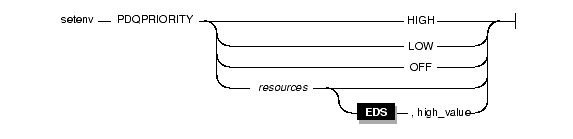
The PDQPRIORITY environment variable determines the degree of parallelism that the database server uses and affects how the database server allocates resources, including memory, processors, and disk reads.
 For Enterprise Decision Server, the PDQPRIORITY environment variable determines only the allocation of memory resources.
|
 When the PDQPRIORITY environment variable is:
 When the PDQPRIORITY environment variable is:
Usually, the more resources a database server uses, the better its performance for a given query. However, if the database server uses too many resources, contention among the resources can result and take resources away from other queries, which results in degraded performance. For more information on performance considerations for PDQPRIORITY, refer to your Performance Guide.
An application can override the setting of the environment variable when it issues the SQL statement SET PDQPRIORITY, which the Informix Guide to SQL: Syntax describes.
 PLCONFIG
The PLCONFIG environment variable specifies the name of the configuration file that the High-Performance Loader (HPL) uses. This configuration file must reside in the $INFORMIXDIR/etc directory. If the PLCONFIG environment variable is not set, $INFORMIXDIR/etc/plconfig is the default configuration file.

|
| filename | specifies the simple filename of the configuration file that the High-Performance Loader uses. |
For example, to specify the $INFORMIXDIR/etc/custom.cfg file as the configuration file for the High-Performance Loader, enter the following command:
For more information, see the Guide to the High-Performance Loader.
 PLOAD_LO_PATH
The PLOAD_LO_PATH environment variable lets you specify the pathname for smart-large-object handles (which identify the location of smart large objects such as BLOB, CLOB, and BOOLEAN data types).

|
pathname | specifies the directory for the smart-large-object handles. |
If PLOAD_LO_PATH is not set, the default directory is /tmp.
For more information, see the Guide to the High-Performance Loader.
 PLOAD_SHMBASE
The PLOAD_SHMBASE environment variable lets you specify the shared-memory address at which the High-Performance Loader (HPL) onpload processes will attach. If PLOAD_SHMBASE is not set, the HPL determines which shared-memory address to use.

|
value | is used to calculate the shared-memory address. |
If the onpload utility cannot attach, an error appears and you must specify a new value.
The onpload utility tries to determine at which address to attach, as follows:
Tip: Informix recommends that you let the HPL decide where to attach and that you set PLOAD_SHMBASE only if necessary to avoid shared-memory collisions between onpload and the database server.
For more information, see the Guide to the High-Performance Loader.
The PSORT_DBTEMP environment variable specifies a directory or directories where the database server writes the temporary files it uses when it performs a sort.
The database server uses the directory that PSORT_DBTEMP specifies even if the environment variable PSORT_NPROCS is not set.

|
pathname | is the name of the UNIX directory used for intermediate writes during a sort. |
To set the PSORT_DBTEMP environment variable to specify the directory (for example, /usr/leif/tempsort), enter the following command:
For maximum performance, specify directories that reside in file systems on different disks.
You might also want to consider setting the environment variable DBSPACETEMP to place temporary files used in sorting in dbspaces rather than operating-system files. See the discussion of the DBSPACETEMP environment variable on page 3-51.
For additional information about the PSORT_DBTEMP environment variable, see your Administrator's Guide and your Performance Guide.
The PSORT_NPROCS environment variable enables the database server to improve the performance of the parallel-process sorting package by allocating more threads for sorting.
 PSORT_NPROCS does not necessarily improve sorting speed for Enterprise Decision Server because the database server sorts in parallel whether this environment variable is set or not.
Before the sorting package performs a parallel sort, make sure that the database server has enough memory for the sort.

|
threads | specifies the maximum number of threads to be used to sort a query. The maximum value of threads is10. |
The following command sets the PSORT_NPROCS environment variable to 4:
To disable parallel sorting, enter the following command:
Informix recommends that you initially set PSORT_NPROCS to 2 when your computer has multiple CPUs. If subsequent CPU activity is lower than I/O activity, you can increase the value of PSORT_NPROCS.
Tip: If the PDQPRIORITY environment variable is not set, the database server allocates the minimum amount of memory to sorting. This minimum memory is insufficient to start even two sort threads. If you have not set the PDQPRIORITY environment variable, check the available memory before you perform a large-scale sort (such as an index build) and make sure that you have enough memory.
Default Values for Ordinary Sorts
If the PSORT_NPROCS environment variable is set, the database server uses the specified number of sort threads as an upper limit for ordinary sorts. If PSORT_NPROCS is not set, parallel sorting does not take place. The database server uses one thread for the sort. If PSORT_NPROCS is set to 0, the database server uses three threads for the sort.
The default number of threads is different for attached indexes.
If the PSORT_NPROCS environment variable is set, you get the specified number of sort threads for each fragment of the index that is being built.
If the PSORT_NPROCS environment variable is not set, or if it is set to 0, you get two sort threads for each fragment of the index unless you have a single-CPU virtual processor. If you have a single-CPU virtual processor, you get one sort thread for each fragment of the index.
For additional information about the PSORT_NPROCS environment variable, see your Administrator's Guide and your Performance Guide.
 SHLIB_PATH
The SHLIB_PATH environment variable tells the shell on HP-UX systems which directories to search for dynamic-link libraries for the INTERSOLV DataDirect ODBC Driver. You must specify the full pathname for the directory where you installed the product.

|
pathname | specifies the search path for the libraries. |
On Solaris, set LD_LIBRARY_PATH. On AIX, set LIBPATH.
 STMT_CACHE
Use the STMT_CACHE environment variable to control the use of the shared-statement cache on a session. This feature can reduce memory consumption and speed query processing among different user sessions. Valid STMT_CACHE values are 1 and 0.

|
Set the STMT_CACHE environment variable for applications that do not use the SET STMT_CACHE statement to control the use of the SQL statement cache.
This environment variable has no effect if the SQL statement cache is disabled through the configuration setting. The SET STMT_CACHE statement in the application overrides the STMT_CACHE environment variable setting.
 TERM
The TERM environment variable is used for terminal handling. It lets DB-Access recognize and communicate with the terminal that you are using.

|
type | specifies the terminal type. |
The terminal type specified in the TERM setting must correspond to an entry in the termcap file or terminfo directory. Before you can set the TERM environment variable, you must obtain the code for your terminal from the database administrator.
For example, to specify the vt100 terminal, set the TERM environment variable by entering the following command:
 TERMCAP
The TERMCAP environment variable is used for terminal handling. It tells DB-Access to communicate with the termcap file instead of the terminfo directory.

|
pathname | specifies the location of the termcap file. |
The termcap file contains a list of various types of terminals and their characteristics. For example, to provide DB-Access terminal-handling information, which is specified in the /usr/informix/etc/termcap file, enter the following command:
You can use any of the following settings for TERMCAP. Use them in the following order:
If you set the TERMCAP environment variable, be sure that the INFORMIXTERM environment variable is set to the default, termcap.
If you do not set the TERMCAP environment variable, the system file (that is, /etc/termcap) is used by default.
 TERMINFO
The TERMINFO environment variable is used for terminal handling.
The environment variable is supported only on platforms that provide full support for the terminfo libraries that System V and Solaris UNIX systems provide.

|
TERMINFO tells DB-Access to communicate with the terminfo directory instead of the termcap file. The terminfo directory has subdirectories that contain files that pertain to terminals and their characteristics.
To set TERMINFO, enter the following command:
If you set the TERMINFO environment variable, you must also set the INFORMIXTERM environment variable to terminfo.
 THREADLIB
Use the THREADLIB environment variable to compile multithreaded ESQL/C applications. A multithreaded ESQL/C application lets you establish as many connections to one or more databases as there are threads. These connections can remain active while the application program executes.
The THREADLIB environment variable indicates which thread package to use when you compile an application. Currently only the Distributed Computing Environment (DCE) is supported.

|
The THREADLIB environment variable is checked when the -thread option is passed to the ESQL/C script when you compile a multithreaded ESQL/C application. When you use the -thread option while compiling, the ESQL/C script generates an error if the THREADLIB environment variable is not set or if the variable is set to an unsupported thread package.
 XFER_CONFIG
The XFER_CONFIG environment variable specifies the location of the xfer_config configuration file.

|
pathname | specifies the location of the xfer_config file. |
The xfer_config file works with the onxfer utility to help users migrate from Version 7.x to Version 8.x. It contains various configuration parameter settings that users can modify and a list of tables that users can select to be transferred.
The default xfer_config file is located in the $INFORMIXDIR/etc directory on UNIX systems or in the %INFORMIXDIR%\etc directory on Windows NT.