| Informix Guide to SQL: Tutorial Composing SELECT Statements |
|
|
The SELECT statement is constructed of clauses that let you look at data in a relational database. These clauses let you select columns and rows from one or more database tables or views, specify one or more conditions, order and summarize the data, and put the selected data in a temporary table.
This chapter shows how to use five SELECT statement clauses. You must include these clauses in a SELECT statement in the following order:
Only the SELECT and FROM clauses are required. These two clauses form the basis for every database query because they specify the tables and columns to be retrieved. Use one or more of the other clauses from the following list:
Two additional SELECT statement clauses, GROUP BY and HAVING, let you perform more complex data retrieval. They are introduced in Chapter 5. Another clause, INTO, specifies the program or host variable to receive data from a SELECT statement in INFORMIX-NewEra and SQL APIs. Complete syntax and rules for using the SELECT statement are in the Informix Guide to SQL: Syntax.
The SELECT statement, unlike INSERT, UPDATE, and DELETE statements, does not modify the data in a database. It simply queries the data. Whereas only one user at a time can modify data, multiple users can query or select the data concurrently. The statements that modify data appear in Chapter 6. The syntax descriptions of the INSERT, UPDATE, and DELETE statements appear in the Informix Guide to SQL: Syntax.
In a relational database, a column is a data element that contains a particular type of information that occurs in every row in the table. A row is a group of related items of information about a single entity across all columns in a database table.
You can select columns and rows from a database table; from a system-catalog table, a special table that contains information on the database; or from a view, a virtual table created to contain a customized set of data. System catalog tables are described in the Informix Guide to SQL: Reference. Views are discussed in the Informix Guide to Database Design and Implementation.
Before you make a query against data, make sure you have the Connect privilege on the database and the Select privilege on the table. These privileges are normally granted to all users. Database access privileges are discussed in the Informix Guide to Database Design and Implementation and in the GRANT and REVOKE statements in the Informix Guide to SQL: Syntax.
A relational operation involves manipulating one or more tables, or relations, to result in another table. The three kinds of relational operations are selection, projection, and join. This chapter includes examples of selection, projection, and simple joining.
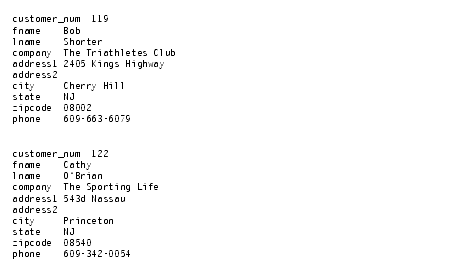
In relational terminology, selection is defined as taking the horizontal subset of rows of a single table that satisfies a particular condition. This kind of SELECT statement returns some of the rows and all the columns in a table. Selection is implemented through the WHERE clause of a SELECT statement, as Query 2-1 shows.
Query Result 2-1 contains the same number of columns as the customer table, but only a subset of its rows. Because the data in the selected columns does not fit on one line of the DB-Access or the Relational Object Manager screen, the data is displayed vertically instead of horizontally
.
In relational terminology, projection is defined as taking a vertical subset from the columns of a single table that retains the unique rows. This kind of SELECT statement returns some of the columns and all the rows in a table.
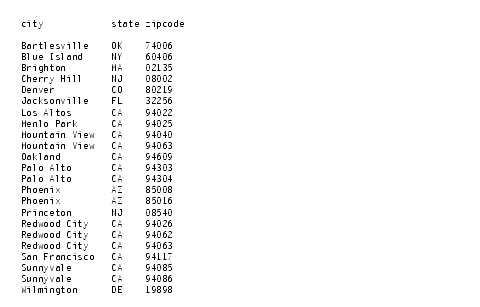
Projection is implemented through the select list in the SELECT clause of a SELECT statement, as Query 2-2 shows.
Query Result 2-2 contains the same number of rows as the customer table, but it projects only a subset of the columns in the table.
The most common kind of SELECT statement uses both selection and projection. A query of this kind returns some of the rows and some of the columns in a table, as Query 2-3 shows.
Query Result 2-3 contains a subset of the rows and a subset of the columns in the customer table.
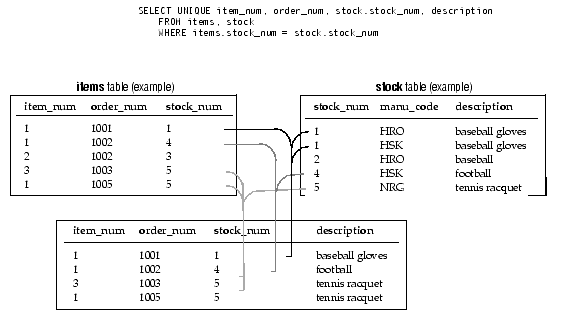
A join occurs when two or more tables are connected by one or more columns in common, which creates a new table of results. Figure 2-1 shows a query that uses a subset of the items and stock tables to illustrate the concept of a join.
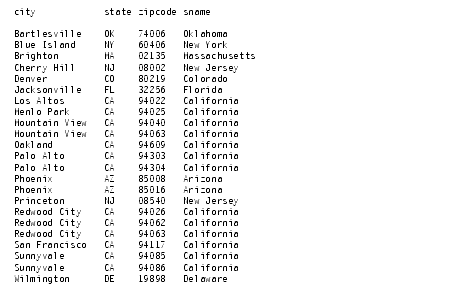
Query 2-4 joins the customer and state tables.
Query Result 2-4 consists of specified rows and columns from both the customer and state tables
.
Although the syntax remains the same across all Informix products, the form of a SELECT statement and the location and formatting of the resulting output depends on the application. The examples in this chapter and in Chapter 5 display the SELECT statements and their output as they appear when you use the interactive Query-language option in DB-Access or the Relational Object Manager. You can also embed SELECT statements in a language such as Informix ESQL/C (where the statements are treated as executable code).
With DB-Access or the Relational Object Manager, when you issue a SELECT statement that includes a TEXT or BYTE data type, also called a simple large object, or a BLOB or CLOB data type, also called a smart large object, the results of the query are displayed differently, as follows:
Differences specific to TEXT, BYTE, BLOb, and CLOB are noted as appropriate throughout this chapter.
 You can issue a SELECT statement that queries NCHAR columns instead of CHAR columns or NVARCHAR columns instead of VARCHAR columns.
For more global language support (GLS) information, see the Informix Guide to GLS Functionality. For additional information on GLS and other data types, see the Informix Guide to Database Design and Implementation and the Informix Guide to SQL: Reference.