| Informix Guide to SQL: Tutorial Composing SELECT Statements |
|
|
To select data from two or more tables, name these tables in the FROM clause. Add a WHERE clause to create a join condition between at least one related column in each table. This WHERE clause creates a temporary composite table in which each pair of rows that satisfies the join condition is linked to form a single row.
A simple join combines information from two or more tables based on the relationship between one column in each table. A composite join is a join between two or more tables based on the relationship between two or more columns in each table.
To create a join, you must specify a relationship, called a join condition, between at least one column from each table. Because the columns are being compared, they must have compatible data types. When you join large tables, performance improves when you index the columns in the join condition.
Data types are described in the Informix Guide to SQL: Reference and the Informix Guide to Database Design and Implementation. Indexing is discussed in detail in the Administrator's Guide.
When you perform a multiple-table query that does not explicitly state a join condition among the tables, you create a Cartesian product. A Cartesian product consists of every possible combination of rows from the tables. This result is usually large and unwieldy, and the data is inaccurate.
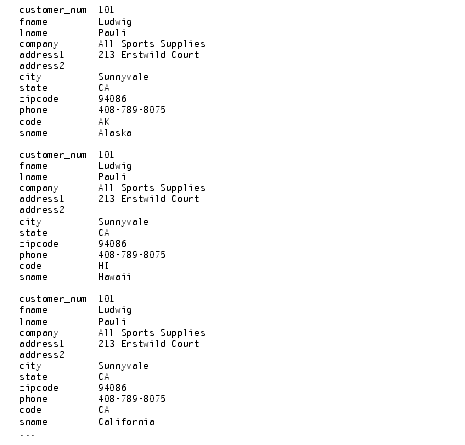
Query 2-57 selects from two tables and produces a Cartesian product.
Although only 52 rows exist in the state table and 28 rows in the customer table, the effect of Query 2-57 is to multiply the rows of one table by the rows of the other and retrieve an impractical 1,456 rows, as Query Result 2-57 shows.
Some of the data that is displayed in the concatenated rows is inaccurate. For example, although the city and state from the customer table indicate an address in California, the code and sname from the state table might be for a different state.
Conceptually, the first stage of any join is the creation of a Cartesian product. To refine or constrain this Cartesian product and eliminate meaningless rows of data, include a WHERE clause with a valid join condition in your SELECT statement.
This section illustrates equi-joins, natural joins, and multiple-table joins. Additional complex forms, such as self-joins and outer joins, are discussed in Chapter 5.
An equi-join is a join based on equality or matching values. This equality is indicated with an equal sign (=) in the comparison operation in the WHERE clause, as Query 2-58 shows.
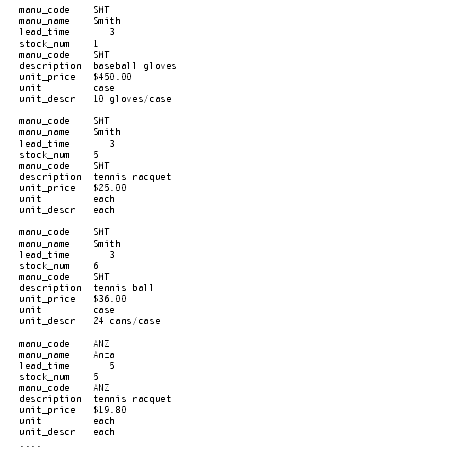
Query 2-58 joins the manufact and stock tables on the manu_code column. It retrieves only those rows for which the values for the two columns are equal, as Query Result 2-58 shows.
In this equi-join, Query Result 2-58 includes the manu_code column from both the manufact and stock tables because the select list requested every column.
You can also create an equi-join with additional constraints, one where the comparison condition is based on the inequality of values in the joined columns. These joins use a relational operator in addition to the equal sign (=) in the comparison condition that is specified in the WHERE clause.
To join tables that contain columns with the same name, precede each column name with a period and its table name, as Query 2-59 shows.
Query 2-59 joins the customer_num column and then selects only those rows where the call_dtime in the cust_calls table is greater than or equal to the ship_date in the orders table. Query Result 2-59 shows the rows that it returns.
A natural join is structured so that the join column does not display data redundantly, as Query 2-60 shows.
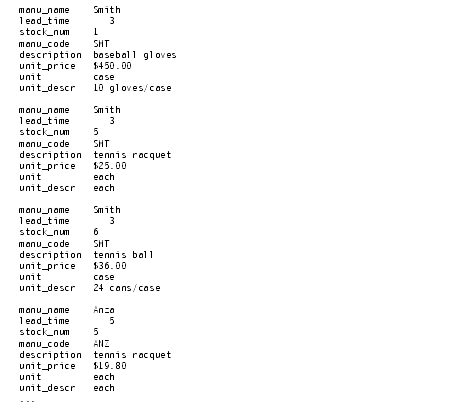
Like the example for equi-join, Query 2-60 joins the manufact and stock tables on the manu_code column. Because the select list is more closely defined, the manu_code is listed only once for each row retrieved, as Query Result 2-60 shows.
All joins are associative; that is, the order of the joining terms in the WHERE clause does not affect the meaning of the join.
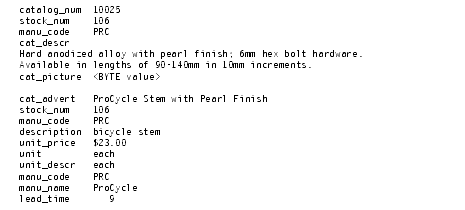
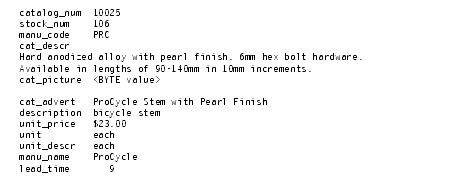
Both statements in Query 2-61 create the same natural join.
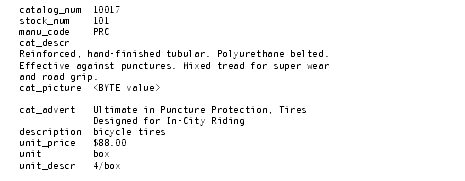
Each statement retrieves the row that Query Result 2-61 shows.
Query 2-61 includes a TEXT column, cat_descr; a BYTE column, cat_picture; and a VARCHAR column, cat_advert.
A multiple-table join connects more than two tables on one or more associated columns; it can be an equi-join or a natural join.
Query 2-62 creates an equi-join on the catalog, stock, and manufact tables.
Query 2-62 retrieves the rows that Query Result 2-62 shows.
The manu_code is repeated three times, once for each table, and stock_num is repeated twice.
To avoid the considerable duplication of a multiple-table query such as Query 2-62, include specific columns in the select list to define the SELECT statement more closely, as Query 2-63 shows.
Query 2-63 uses a wildcard to select all columns from the table with the most columns and then specifies columns from the other two tables. Query Result 2-63 shows the natural join that Query 2-63 produces. It displays the same information as the previous example, but without duplication.
You can use aliases, the INTO TEMP clause, and display labels to speed your way through joins and multiple-table queries and to produce output for other uses.
You can assign aliases to the tables in a SELECT statement to make multiple-table queries shorter and more readable. You can use an alias wherever the table name would be used, for instance, as a prefix to the column names in the other clauses.
The associative nature of the SELECT statement allows you to use an alias before you define it. In Query 2-64a, the aliases s for the stock table, c for the catalog table, and m for the manufact table are specified in the FROM clause and used throughout the SELECT and WHERE clauses as column prefixes.
Compare the length of Query 2-64a with Query 2-64b, which does not use aliases.
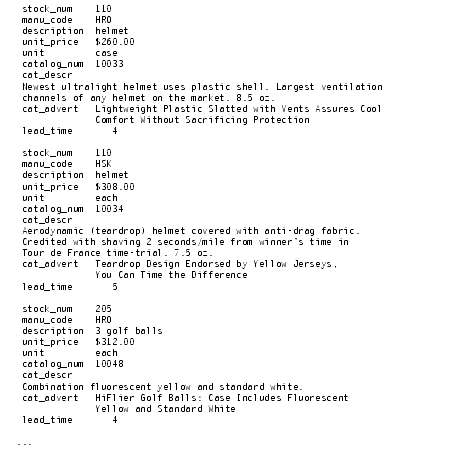
Query 2-64a and Query 2-64b are equivalent and retrieve the data that Query Result 2-64 shows.
You cannot use the ORDER BY clause for the TEXT column cat_descr or the BYTE column cat_picture.
You can use aliases to shorten your queries on tables that are not in the current database.
Query 2-65 joins columns from two tables that reside in different databases and systems, neither of which is the current database or system.
By assigning the aliases c and o to the long database@system:table names,
masterdb@central:customer and sales@western:orders, respectively, you can use the aliases to shorten the expression in the WHERE clause and retrieve the data, as Query Result 2-65 shows.
For more information on how to access tables that are not in the current database, see Selecting Tables from a Database Other Than the Current Database and the Informix Guide to SQL: Syntax.
You can also use synonyms as shorthand references to the long names of tables that are not in the current database as well as current tables and views. For details on how to create and use synonyms, see the Informix Guide to Database Design and Implementation.
By adding an INTO TEMP clause to your SELECT statement, you can temporarily save the results of a multiple-table query in a separate table that you can query or manipulate without modifying the database. Temporary tables are dropped when you end your SQL session or when your program or report terminates.
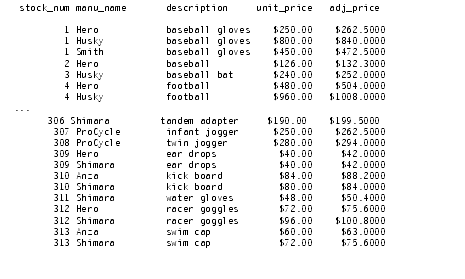
Query 2-66 creates a temporary table called stockman and stores the results of the query in it. Because all columns in a temporary table must have names, the alias adj_price is required.
You can query this table and join it with other tables, which avoids a multiple sort and lets you move more quickly through the database. For more information on temporary tables, see the Informix Guide to SQL: Syntax and the Administrator's Guide.