
| INFORMIX-ESQL/C Programmer's Manual Working with Complex Data Types of the Universal Data Option |
|
|
Informix Dynamic Server with Universal Data Option supports the following kinds of collections:
Both SQL and ESQL/C enable you to use the SQL collection derived table clause to access the elements of a collection as if they were rows in a table. In ESQL/C, the collection derived table takes the form of a collection variable. The collection variable is a host variable into which you retrieve the collection. Once you have retrieved the collection into a collection variable, you can perform select, insert, update, and delete operations on it, with restrictions. For more information on how to access a collection with an ESQL/C collection variable, see Declaring Collection Variables, and more specifically, Operating on a Collection Variable.
 Important: When the SQL statement references a collection variable, ESQL/C and not the database server, processes the statement.
SQL allows you to perform read-only (SELECt) operations on a collection by implementing the collection derived table as a virtual table.
When the SELECt statement for a collection does not reference an ESQL/C collection variable, the database server performs the query.
Consider, for example, the following schema:
You can select the children's names and IDs from the table parent using the following SELECT statement:
To execute the query, the database server creates a virtual table (c_table) from the list children in the row of the parents table where parents.id equals 1001.
The advantage of querying a collection as a virtual table as opposed to querying it through a collection variable is that the virtual table provides more efficient access. By contrast, if you were to use collection variables, you might be required to allocate multiple variables and multiple cursors. For example, consider the following schema:
You can query the collection derived table as a virtual table as shown in the following SELEcT statement:
To perform the same query using collection variables you need to execute the following statements:

The following restrictions apply to querying a collection derived table that is a virtual table:
To access the elements of a column that has a collection type (LIST, MULTISET, or SET) as its data type, perform the following steps:
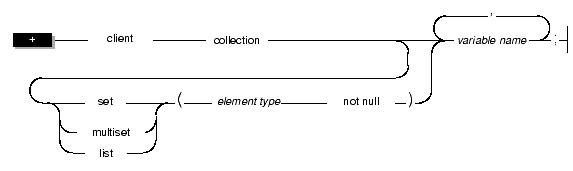
Use the collection data type to declare host variables for columns of collection data types (SET, MULTISET, or LIST). As the following syntax diagram illustrates, you must use the collection keyword as the data type for a collection host variable.
|
A collection variable can be any SQL collection type: LIST, MULTISET, or SET.
 Important: You must specify the client keyword when you declare collection variables.
Typed and Untyped Collection Variables
ESQL/C supports the following two collection variables:
A typed collection variable provides an exact description of the collection. This declaration specifies the data type of the collection (SET, MULTISET, or LIST) and the element type for the collection variable.
Figure 9-1 shows declarations for three typed collection variables.
Typed collection variables can contain elements with the following data types:
When you specify the element type of the collection variable, use the SQL data types, not the ESQL/C data types. For example, as the declaration for the list1 variable in Figure 9-1 on page 9-9 illustrates, use the SQL SMALLINT data type, not the ESQL/C short data type, to declare a LIST variable whose elements are small integers. Similarly, use the SQL syntax for a CHAR column to declare a SET variable whose elements are character strings, as the following example illustrates:
 Important: You must specify the not-null constraint on the element type of a collection variable.
A named row type is not valid as the element type of a collection variable. However, you can specify an element type of unnamed row type, whose fields match those of the named row type.
For example, suppose your database has the named row type, myrow, and the database table, mytable, that are defined as follows:
You can define a collection variable for the col2 column of mytable as follows:
You can declare a typed collection variable whose element type is different from that of the collection column as long as the two data types are compatible. If the database server is able to convert between the two element types, it automatically performs this conversion when it returns the fetched collection.
Suppose you create the tab1 table as follows:
You can declare a typed collection variable whose element type matches (set_int) or one whose element type is compatible (set_float), as follows:
When it executes the first FETCH statement, the ESQL/C client program automatically converts the integer elements in the column to the float values in the set_float host variable. The ESQL/C program only generates a type-mismatch error if you change the host variable after the first fetch. In the preceding code fragment, the second FETCH statement generates a type-mismatch error because the initial fetch has already defined the element type as float.
Use a typed collection variable in the following cases:
Match the declaration of a typed collection variable exactly with the data type of the collection column. You can then use this collection variable directly in SQL statements such as INSERT, DELETE, or UPDATE, or in the collection-derived table clause. (For more information on the collection-derived table clause, see Using the Collection-Derived Table Clause on Collections.)
 Tip: If you do not know the exact data type of the collection column you want to access, use an untyped collection variable.
For more information, see The Untyped Collection Variable.
In a single declaration line, you can declare several collection variables for the same typed collection, as the following declaration shows:
You cannot declare collection variables for different collection types in a single declaration line.
The Untyped Collection VariableAn untyped collection variable provides a general description of a collection. This declaration includes only the collection keyword and the variable name. The following lines declare three untyped collection variables:
The advantage of an untyped collection host variable is that it provides more flexibility in collection definition. For an untyped collection variable, you do not have to know the definition of the collection column at compile time. Instead, you obtain, at runtime, a description of the collection from a collection column with the SELECT statement.
 Tip: If you know the exact data type of the collection column you want to access, use a typed collection variable.
For more information, see page 9-9.
To obtain the description of a collection column, execute a SELECT statement to retrieve the column into the untyped collection variable. The database server returns the column description (the collection type and the element type) with the column data. ESQL/C assigns this definition of the collection column to the untyped collection variable.
For example, suppose the a_coll host variable is declared as an untyped collection variable, as follows:
The following code fragment uses a SELECT statement to initialize the a_coll variable with the definition of the list_col collection column (which Figure 9-2 on page 9-19 defines) before it uses the collection variable in an INSERT statement:
For more information about the ALLOCATE COLLECTION statement, see Managing Memory for Collections. For more information about how to insert into a collection variable, see Inserting into a Collection Variable.
To obtain the description of a collection column, your application must verify that a collection column has data in it before it selects the column. If the table has no rows in it, the SELECT statement returns neither column data nor the column description and ESQL/C cannot assign the column description to the untyped collection variable.
You can use an untyped collection variable to store collections with different column definitions, as long as you select the associated collection column description into the collection variable before you use the variable in an SQL statement.
 Important: You must obtain the definition of a collection column for an untyped collection variable before you use the variable in an SQL statement. Before the collection variable can hold any values, you must use a SELECT statement to obtain a description of the collection data type from a collection column in the database. Therefore, you cannot insert or select values directly into an untyped collection variable.
Client Collections
The ESQL/C application declares the collection variable name, allocates the memory for it with the ALLOCATE COLLECTION statement, and performs operations on the collection data.
To access the elements of a collection variable, specify the variable in the Collection Derived Table clause of a SELECT, INSERT, UPDATE, or DELETE statement. ESQL/C will perform the select, insert, update, or delete operation. ESQL/C does not send these statements to the database server when they include a client collection variable in the collection-derived table clause.
For example, ESQL/C performs the following INSERT operation on the a_multiset collection variable:
When an SQL statement includes a collection variable, it has the following syntax restrictions:
For more information about how to insert into a collection variable, see Inserting into a Collection Variable. For more information on a collection-derived table, see Operating on a Collection Variable.
ESQL/C does not automatically allocate or deallocate memory for collection variables. You must explicitly manage the memory that is allocated to a collection variable.
Use the following SQL statements to manage memory for both typed and untyped collection host variables:
The following code fragment declares the a_set host variable as a typed collection, allocates memory for this variable, then deallocates memory for this variable:


The ALLOCATE COLLECTION statement allocates memory for the collection variable and the collection data. For syntax information for the ALLOCATE COLLECTION and DEALLOCATE COLLECTION statements, refer to their descriptions in the Informix Guide to SQL: Syntax.
Informix Dynamic Server with Universal Data Option supports access to a collection column as a whole through the SELECT, UPDATE, INSERT, and DELETE statements. For example, the SELECT statement can retrieve all elements of a collection, and the UPDATE statement can update all elements in a collection to a single value. (For more information, see Operating on a Collection Column.)
 Tip: Informix Dynamic Server with Universal Data Option can only access the contents of collection columns directly with the IN predicate in the WHERE clause of a SELECT statement and this IN predicate works only with simple collections (collections whose element types are not complex types).
The SELECT, INSERT, UPDATE, and DELETE statements cannot access elements of a collection column in a table. To access elements in a collection column, an ESQL/C application constructs a subtable, called a collection-derived table, in the collection host variable. From collection-derived table, the ESQL/C application to access the elements of the collection variable as rows of a table.
This section discusses the following topics on how to use a collection-derived table in an ESQL/C application to access a collection column:
The collection-derived table clause allows you to specify a collection host variable as a table name. This clause has the following syntax:
In this example, coll_var is a collection host variable. It can be either a typed or untyped collection host variable, but it must be declared and have memory allocated in the ESQL/C application before it appears in a collection-derived table clause.
For more information on the syntax of the collection-derived table clause, see the description of the collection-derived table segment in the Informix Guide to SQL: Syntax.
Accessing a Collection VariableIn SQL statements, the ESQL/C application specifies a collection-derived table in place of a table name to perform the following operations on the collection host variable:
 Tip: If you only need to insert or update a collection column with literal values, you do not need to use a collection host variable. Instead, you can explicitly list the literal-collection value in either the INTO clause of the INSERT statement or the SET clause of the UPDATE statement.
For more information, see Inserting into and Updating a Collection Column.
Once the collection host variable contains valid elements, you update the collection column with the contents of the host variable. For more information, see Operating on a Collection Column. For more information on the syntax of the collection-derived table clause, see the description of the collection-derived table segment in the Informix Guide to SQL: Syntax.
Distinguishing Between Columns and Collection VariablesWhen you use the collection-derived table clause with a collection host variable in an SQL statement (such as SELECT, INSERT, or UPDATE), the statement is not sent to the database server for processing. Instead, ESQL/C processes the statement. Consequently, some of the syntax checking that the database server performs is not done on SQL statements that include the collection-derived table clause.
In particular, the ESQL/C preprocessor cannot distinguish between column names and host variables. Therefore, when you use the collection-derived table clause with an UPDATE or INSERT statement, you must use valid host-variable syntax in:
For more information, see Distinguishing Between Columns and Row Variables.
You must always initialize an untyped collection variable by selecting a collection column into it. You must execute a SELECT statement, regardless of the operation you wish to perform on the untyped collection variable.
 Important: Selecting the collection column into the untyped collection variable provides ESQL/C with a description of the collection declaration.
For more information, see The Untyped Collection Variable.
You can initialize a collection variable by selecting a collection column into the collection variable, constructing the SELECT statement as follows:
You can initialize a typed collection variable by executing an INSERT statement that uses the collection derived table syntax. You do not need to initialize a typed collection variable before an INSERT or UPDATE because ESQL/C has a description of the collection variable.
Suppose, for example, that you create the tab_list and tab_set tables with the statements in Figure 9-2.
The following code fragment accesses the set_col column with a typed collection host variable called a_set:
When you use a typed collection host variable, the description of the collection column (the collection type and the element type) should be compatible with the corresponding description of the typed collection host variable. If the data types don't match, the database server will do a cast if it can. The SELECT statement in the preceding code fragment successfully retrieves the set_col column because the a_set host variable has the same collection type (SET) and element type (INTEGER) as the set_col column.
The following SELECT statement succeeds because the database server casts list_col column to a set in a_set host variable and discards any duplicates:
You can select any type of collection into an untyped collection host variable. The following code fragment uses an untyped collection host variable to access the list_col and set_col columns that Figure 9-2 on page 9-19 defines:

Both SELECT statements in this code fragment can successfully retrieve collection columns into the a_collection host variable.
Once you have initialized the collection host variable, you can use the collection-derived table clause to select, update, or delete existing elements in the collection or to insert additional elements into the collection. For more information, see the following sections.
To insert one or more elements into a collection variable, use the INSERT statement with the collection-derived table clause after the INTO keyword. The collection- derived table clause identifies the collection variable in which to insert the elements. Associate the INSERT statement and the collection-derived table clause with a cursor to insert more than one element into a collection variable.
 Important: You cannot use expressions in the VALUES clause and you cannot use a WHERE clause.
For information on the types of values you can insert into a collection variable, see Specifying Element Values.
Inserting One ElementThe INSERT statement and the collection-derived table clause allow you to insert one element into a collection. ESQL/C inserts the values that the VALUES clause specifies into the collection variable that the collection-derived table clause specifies.
 Tip: When you insert elements into a client-side collection variable, you cannot specify a SELECT, an EXECUTE FUNCTION, or an EXECUTE PROCEDURE statement in the VALUES clause of the INSERT.
Inserting into SET and MULTISET Collections
For SET and MULTISET collections, the position of the new element is undefined, because the elements of these collections do not have ordered positions. Suppose the table readings has the following declaration:
To access the time_dataset column, the typed ESQL/C host variable time_vals has the following declaration:
The following INSERT statement adds a new MULTISET element of 1,423,231 to time_vals:
For more information on the ifx_int8cvint() function and the INT8 data type, see Chapter 5, Working with Numeric Data Types.
Inserting into LIST CollectionsLIST collections have elements that have ordered positions. If the collection is of type LIST, you can use the AT clause of the INSERT statement to specify the position in the list at which you want to add the new element. Suppose the table rankings has the following declaration:
To access the item_rankings column, the typed ESQL/C host variable rankings has the following declaration:
The following INSERT statement adds a new list element of 9 as the new third element of rankings:
Suppose that before this insert, rankings contained the elements {1,8,4,5,2}. After this insert, this variable contains the elements {1,8,9,4,5,2}.
If you do not specify the AT clause, INSERT adds new elements at the end of a LIST collection. For more information on the AT clause, see the description of the INSERT statement in the Informix Guide to SQL: Syntax.
Inserting More Than One ElementAn insert cursor that includes an INSERT statement with the collection-derived table clause allows you to insert many elements into a collection variable. To insert elements, follow these steps:
For more information, see Inserting One Element.
The following sections provide information on how to declare an insert cursor for a collection variable, put elements into this cursor, and save the insert cursor into the collection variable. For sample code that inserts several elements into a collection variable, see Figure 9-3 on page 9-26.
Declaring an Insert Cursor for a Collection VariableAn insert cursor allows you to insert one or more elements in the collection. To declare an insert cursor for a collection variable, include the collection-derived table clause in the INSERT statement that you associate with the cursor. The insert cursor for a collection variable has the following restrictions:
If you need to use input parameters, you must prepare the INSERT statement and specify the prepared statement identifier in the DECLARE statement.
You can use input parameters to specify the values in the VALUES clause of the INSERT statement.
The following DECLARE statement declares the list_curs insert cursor for the a_list variable:
You can then use the PUT statement to specify the values to insert. For a code fragment that includes this statement, see Figure 9-3 on page 9-26.
 Important: Whenever you use a question mark (?) in a PREPARE statement for a collection host variable in a collection-derived table, if you execute a DESCRIbE statement you must execute it after an OPEN statement. Until the OPEN statement, ESQL/C does not know what the collection row looks like.

After you declare the insert cursor, you can open it with the OPEN statement. You can insert elements into the collection variable once the associated insert cursor is open.
Putting Elements into the Insert CursorTo put elements, one at a time, into the insert cursor, use the PUT statement and the FROM clause. The PUT statement identifies the insert cursor that is associated with the collection variable. The FROM clause identifies the element value to be inserted into the cursor. The data type of any host variable in the FROM clause must be compatible with the element type of the collection.
To indicate that the collection element is to be provided later by the FROM clause of the PUT statement, use an input parameter in the VALUES clause of the INSERT statement. You can use the PUT statement with an insert cursor following either a static DEClARE statement or the PREPARE statement. The following example uses a PUT following a static DECLARE statement.
No input parameters can appear in the DECLARE statement.
Figure 9-3 contains a code fragment that demonstrates how to insert elements into the collection variable a_list and then to update the list_col column of the tab_list table (which Figure 9-2 on page 9-19 defines) with this new collection.
In Figure 9-3, the first statement that accesses the a_list variable is the OPEN statement. Therefore, at this point in the code, ESQL/C must be able to determine the data type of the a_list variable. Because the a_list host variable is a typed collection variable, ESQL/C can determine the data type from the variable declaration. However, if a_list was declared an untyped collection variable, you would need a SELECT statement before the DECLARE statement executes to return the definition of the associated collection column.
ESQL/C automatically saves the contents of the insert cursor into the collection variable when you put them into the insert cursor with the PUT statement.
Freeing Cursor ResourcesThe CLOSE statement explicitly frees resources assigned to the insert cursor. However, the cursor ID still exists, so you can reopen the cursor with the OPEN statement. The FREE statement explicitly frees the cursor ID. To reuse the cursor, you must redeclare it with the DECLARE statement.
The FLUSH statement does not have an effect on an insert cursor that is associated with a collection variable. For the syntax of the CLOSE statement, see the Informix Guide to SQL: Syntax.
The SELECT statement with the collection-derived table clause allows you to select elements from a collection variable. The collection-derived table clause identifies the collection variable from which to select the elements. The SELECT statement on a client collection variable (one that has the collection-derived table clause) has the following restrictions:
The SELECT statement and the collection-derived table clause allow you to perform the following operations on a collection variable:
The SELECT statement and the collection-derived table clause allow you to select one element into a collection. The INTO clause identifies the variable in which to store the element value that is selected from the collection variable. The data type of the host variable in the INTO clause must be compatible with the element type of the collection.
The following code fragment selects only one element from the set_col column (see Figure 9-2 on page 9-19) with a typed collection host variable called a_set:
 Important: Use this form of the SELECT statement when you are sure that the SELECT returns only one element. ESQL/C returns an error if the SELECT returns more than one element. If you do not know the number of elements in the set or if you know that the set contains more than one element, use a select cursor to access the elements.
For more information on how to use a select cursor, see Selecting More Than One Element.
If the element of the collection is itself a complex type (collection or row type), the collection is a nested collection. For information on how to use a cursor to select elements from a nested collection, see Selecting Values from a Nested Collection. The following section describes how to use a row variable to select a row element from a collection.
Selecting One Row ElementYou can select an entire row element from a collection into a row type host variable. The INTO clause identifies a row variable in which to store the row element that is selected from the collection variable.
The following code fragment selects one row from the set_col column into the row type host variable a_row:
A select cursor that includes a SELECT statement with the collection-derived table clause allows you to select many elements from a collection variable. To select elements, follow these steps:
To declare a select cursor for a collection variable, include the collection-derived table clause with the SELECT statement that you associate with the cursor. The DECLARE for this select cursor has the following restrictions:
When you declare a select cursor for a collection variable, the collection-derived table clause of the SELECT statement must contain the name of the collection variable. For example, the following DECLARE statement declares a select cursor for the collection variable, a_set:

To select the element(s) from the collection variable, use the FETCH statement with the INTO clause. For more information, see Fetching Elements from the Select Cursor.
If you want to modify the elements of the collection variable, declare the select cursor as an update cursor with the FOR UPDATE keywords. You can then use the WHERE CURRENT OF clause of the DELETE and UPDATE statements to delete or update elements of the collection. For more information, see Deleting One Element and Updating One Element.
Fetching Elements from the Select CursorTo fetch elements, one at a time, from a collection variable, use the FETCH statement and the INTO clause. The FETCH statement identifies the select cursor that is associated with the collection variable. The INTO clause identifies the host variable for the element value that is fetched from the collection variable. The data type of the host variable in the INTO clause must be compatible with the element type of the collection.
Figure 9-4 contains a code fragment that selects all elements from the set_col column (see Figure 9-2 on page 9-19) into the typed collection host variable called a_set then fetches these elements, one at a time, from the a_set collection variable.
Once you have initialized a collection host variable with a collection column (see page 9-18), you can use the UPDATE statement with the collection-derived table clause to update the elements in the collection. The collection-derived table clause identifies the collection variable whose elements are to be updated. The UPDATE statement and the collection-derived table clause allow you to perform the following operations on a collection variable:
Neither form of the UPDATE statement can include a WHERE clause. For information on the types of values you can specify when you update a collection variable, see Specifying Element Values.
Updating All ElementsYou cannot include a WHERE clause on an UPDATE statement with a collection-derived table clause. Therefore, an UPDATE statement on a collection variable sets all elements in the collection to the value you specify in the SET clause. No update cursor is required to update all elements of a collection.
For example, the following UPDATE changes all elements in the a_list ESQL/C collection variable to a value of 16:

In this example, the derived column list_elmt provides an alias to identify an element of the collection in the SET clause.
Updating One ElementTo update a particular element in a collection, declare an update cursor for the collection host variable. An update cursor for a collection variable is a select cursor that was declared with the FOR UPDATE keywords. The update cursor allows you to sequentially scroll through the elements of the collection and update the current element with the UPDATE...WHERE CURRENT OF statement.
To update elements, follow these steps:
The application must position the update cursor on the element to be updated and then use UPDATE...WHERE CURRENT OF to update this value.
The ESQL/C program in Figure 9-5 uses an update cursor to update an element in the collection variable, a_set, and then to update the set_col column of the tab_set table (see Figure 9-2 on page 9-19).
You can specify any of the following values as elements in a collection variable:
You cannot include complex expressions directly to specific values.
For information on how to insert elements into a collection variable, see Inserting into a Collection Variable. For information on how to update elements in a collection variable, see Updating a Collection Variable. The following sections describe the values you can assign to an element in a collection variable.
Literal Values as ElementsYou can use a literal value to specify an element of a collection variable. The literal values must have a data type that is compatible with the element type of the collection. For example, the following INSERT statement inserts a literal integer into a SET(INTEGER NOT NULL) host variable called a_set:
The following UPDATE statement uses a derived column name (an_element) to update all elements of the a_set collection variable with the literal value of 19:
The following INSERT statement inserts a quoted string into a LIST(CHAR(5)) host variable called a_set2:
The following INSERT statement inserts a literal collection into a SET(LIST(INTEGER NOT NULL) host variable called nested_coll:
 Tip: The syntax of a literal collection for a collection variable is different from the syntax of a literal collection for a collection column. A collection variable does not need to be a quoted string.
For more information on literal-collection values for a collection column, see Inserting into and Updating a Collection Column.
The following UPDATE statement updates the nested_coll collection variable with a new literal collection value:
 Tip: If you only need to insert or update the collection column with literal values, you do not need to use a collection host variable. Instead, you can explicitly list the literal values as a literal collection in either the INTO clause of the INSERT statement or the SET clause of the UPDATE statement.
For more information, see Inserting into and Updating a Collection Column.
ESQL/C Host Variables as ElementsYou can use an ESQL/C host variable to specify an element of a collection variable. The host variable must be declared with a data type that is compatible with the element type of the collection and must contain a value that is also compatible. For example, the following INSERT statement uses a host variable to insert a single value into the same a_set variable as in the preceding example:
To insert multiple values into a collection variable, you can use an INSERT statement for each value or you can declare an insert cursor and use the PUT statement. For more information, see Inserting More Than One Element.
The following UPDATE statement uses a host variable to update all elements in the a_set collection to a value of 4:
To update multiple values into a collection variable, you can declare an update cursor and use the WHERE CURRENT OF clause of the UPDATE statement. For more information, see Updating One Element.
Once you have initialized a collection host variable with a collection column (see page 9-18), you can use the DELETE statement and the collection-derived table clause to delete an element of a collection variable. The collection-derived table clause identifies the collection variable in which to delete the elements.
The DELETE statement and the collection-derived table clause allow you to perform the following operations on a collection variable:
Neither form of the DELETE statement can include a WHERE clause.
Deleting All ElementsYou cannot include a WHERE clause on a DELETE statement with a collection-derived table clause. Therefore, a DELETE statement on a collection variable deletes all elements from the collection. No update cursor is required to delete all elements of a collection.
For example, the following DELETE removes all elements in the a_list ESQL/C collection variable:

To delete a particular element in a collection, declare an update cursor for the collection host variable. An update cursor for a collection variable is a select cursor that was declared with the FOR UPDATE keywords. The update cursor allows you to sequentially scroll through the elements of the collection and delete the current element with the DELETE...WHERE CURRENT OF statement.
To delete particular elements, follow the same steps for how to update particular elements (see Updating One Element). In these steps, you replace the use of the UPDATE...WHERE CURRENT OF statement with the DELETE...WHERE CURRENT OF statement.
The application must position the update cursor on the element to be deleted and then use DELETE...WHERE CURRENT OF to delete this value. The following ESQL/C code fragment uses an update cursor and a DELETE statement with a WHERE CURRENT OF clause to delete the element from the set_col column of tab_set (see Figure 9-2 on page 9-19).

Suppose that in the row with an id_col value of 6, the set_col column contains the values {1,8,4,5,2} before this code fragment executes. After the DELETE...WHERE CURRENT OF statement, this collection variable contains the elements {1,8,5,2}. The UPDATE statement at the end of this code fragment saves the modified collection into the set_col column of the database. Without this UPDATE statement, the collection column never has element 4 deleted.
Informix Dynamic Server with Universal Data Option supports nested collections as a column type. A nested collection is a collection column whose element type is another collection. For example, the code fragment in Figure 9-6 creates the tab_setlist table whose column is a nested collection.
The setlist_col column is a set, each element of which is a list. This nested collection resembles a two-dimensional array with a y-axis of set elements and an x-axis of list elements.
Selecting Values from a Nested CollectionTo select values from a nested collection, you must declare a collection variable and a select cursor for each level of collection. The following code fragment uses the nested collection variable, nested_coll and the collection variable list_coll to select the lowest-level elements in the nested-collection column, setlist_col.


To insert literal values into a collection variable for a nested column, you specify the literal collection for the element type. You do not need to specify the constructor keyword for the actual collection type. The following typed collection host variable can access the setlist_col column of the tab_setlist table:
The following code fragment inserts literal values into the nested_coll collection variable and then updates the setlist_col column (which Figure 9-6 on page 9-40 defines):
To insert nonliteral values into a nested collection, you must declare a collection variable and an insert cursor for each level of collection. For example, the following code fragment uses the nested collection variable, nested_coll, to insert new elements into the nested-collection column, setlist_col.


The collection variable stores the elements of the collection. However, it has no intrinsic connection with a database column. You must use an INSERT or UpDATE statement to explicitly save the contents of the collection variable into the collection column.
You can use the SELECT, UPDATE, INSERT, and DELETE statements to access a collection column (SET, MULTISET, or LIST), as follows:
The following sections summarize these SQL statements with collection columns. For more information on how to use these statements with collection columns, see the Informix Guide to SQL: Tutorial.
To select all elements in a collection column, specify the collection column in the select list of the SELECT statement. If you put a collection host variable in the INTO clause of the SELECT statement, you can access these elements from an ESQL/C application. For more information, see Initializing a Collection Variable. For an example that uses a collection variable to select and display the elements of a collection, see The collect.ec Program.
The INSERT and UPDATE statements support collection columns as follows:
In the VALUES clause of an INSERT statement or the SET clause of an UPDATE statement, the element values can be in any of the following formats:
To represent literal values for a collection column, you specify a literal-collection value. You create a literal-collection value, introduce the value with the SET, MULTISET, or LIST keyword and provide the field values in a comma-separated list that is enclosed in braces. You surround the entire literal-collection value with quotes (double or single). The following INSERT statement inserts the literal collection of SET {7, 12, 59, 4} into the set_col column in the tab_set table (that Figure 9-2 on page 9-19 defines):
The UPDATE statement in Figure 9-7 overwrites the SET values that the previous INSERT added to the tab_set table.
 Important: If you omit the WHERE clause, the UPDATE statement in Figure 9-7 updates the set_col column in all rows of the tab_set table.
If any character value appears in this literal-collection value, it too must be enclosed in quotes; this condition creates nested quotes. For example, for column col1 of type SET(CHAR(5), a literal value can be expressed as follows:
To specify nested quotes in an SQL statement in an ESQL/C program, you must escape every double quote when it appears in a single-quote string. The following INSERT statement shows how to use escape characters for inner double quotes:
When you embed a double-quoted string inside another double-quoted string, you do not need to escape the inner-most quotation marks, as the following INSERT statement shows:
For more information on the syntax of literal values for collection variables, see Literal Values as Elements. For more information on the syntax of literal-collection values for collection columns, see the Literal Collection segment in the Informix Guide to SQL: Syntax.
If the collection or row type is nested, that is, if it contains another collection or row type as a member, the inner collection or row does not need to be enclosed in quotes. For example, for column col2 whose data type is LIST(ROW(a INTEGER, b SMALLINT) NOT NULL), you can express the literal value as follows:
To delete the entire collection in a collection column you can use the UPDATE statement to set the collection to empty. The UPDATE statement in the following example effectively deletes the entire collection in the set_col column of the tab_set table for the row in which id_col equals 5.
The same UPDATE statement without the WHERE clause, as shown in the following example, would set the set_col column to empty for all rows in the tab_set table.
 Important: You must explicitly deallocate memory allocated to a collection variable. Use the DEALLOCATE COLLECTION statement to deallocate the memory.
 Tip: Instead of an insert cursor, you can use an INSERT statement to insert elements one at a time into a collection variable. However, an insert cursor is more efficient for large insertions.


