| Informix Guide to SQL: Reference Data Types |
|
|
 Extended Data Types
Dynamic Server lets you create the following kinds of extended data types to characterize data that cannot be easily represented with the built-in data types:
The following sections provide an overview of each of these data types.
For more information about extended data types, see the Informix Guide to Database Design and Implementation and Extending Informix Dynamic Server 2000.
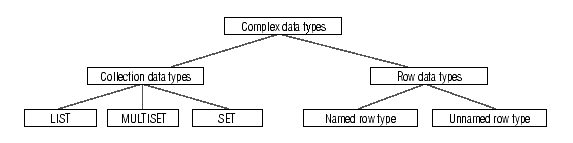
A complex data type is a data type that you build from other data types (built-in and extended). Figure 2-13 shows the complex types that Dynamic Server supports. The table that follows briefly describes the structure of these data types.
Complex data types can be nested. For example, you can construct a row type whose fields include one or more sets, multisets, row types, and/or lists. Likewise, a collection type can have elements whose data type is a row type or a collection type.
All complex types inherit the following support functions:
| input | assign |
| output | destroy |
| send | LO handles |
| recv | hash |
| import | lessthan |
| export | equal |
| import binary | lessthan (ROW only) |
| export binary |
The following sections summarize the complex types. For more information on complex types, see the Informix Guide to Database Design and Implementation.
A collection data type is a complex type that is made up of one or more elements. Every element in a collection has the same data type. A collection element can have any data type (including other complex types) except BYTE, TEXT, SERIAL, or SERIAL8.
 Important: An element cannot have a null value. You must specify the not null constraint for collection elements. No other constraints are valid for collections.
Dynamic Server supports three kinds of collection types: LIST, SET, and MULTISET. The keywords used to construct these collections are called type constructors or just constructors. For a description of each of these collection data types, see its entry in this chapter. For the syntax of collection types, see the Informix Guide to SQL: Syntax.
Using Complex Data Types in Table ColumnsWhen you specify element values for a collection, list the element values after the constructor and between curly brackets. For example, suppose you have a collection column with the following type:
The following INSERT statement adds one group of element values to this MULTISET column. The word MULTISET in the two examples is the MULTISET constructor.
Leave the brackets empty to indicate an empty set:
An empty collection is not equivalent to a null value for the column.
Accessing Collection DataTo access the elements of a collection column, you must fetch the collection into a collection variable and modify the contents of the collection variable. Collection variables can be either of the following types:
You can also use nested dot notation to access collection data. To learn more about accessing the elements of a collection, see the Informix Guide to SQL: Tutorial.
A row type is a sequence of one or more elements called fields. Each field has a name and a data type. The fields of a row are comparable to the columns of a table, but with important differences: a field has no default clause, you cannot define constraints on a field, and you cannot use fields with tables, only with row types.
Two kinds of row types exist:
The structure of an unnamed row type consists of the number and data types of its fields. For more information about row types, see Row, Named and Row, Unnamed.
You can cast between named and unnamed row types. For information about casting between row types, see the Informix Guide to Database Design and Implementation.
A distinct data type has the same internal structure as some other source data type in the database. The source data type can be either a built-in type or an extended type. What distinguishes a distinct type from the source type are the functions defined on this type. For more information, see the description on page 2-23.
An opaque data type is a user-defined data type that is fully encapsulated, that is, whose internal structure is unknown to the database server. For more information, see the description on page 2-35.