| Informix Guide to SQL: Tutorial Composing Advanced SELECT Statements |
|
|
The section Creating a Join shows how to include a WHERE clause in a SELECT statement to join two or more tables on one or more columns. It illustrates natural joins and equi-joins.
This chapter discusses how to use two more complex kinds of joins, self-joins and outer joins. As described for simple joins, you can define aliases for tables and assign display labels to expressions to shorten your multiple-table queries. You can also issue a SELECT statement with an ORDER BY clause that sorts data into a temporary table.
A join does not always have to involve two different tables. You can join a table to itself, creating a self-join. Joining a table to itself can be useful when you want to compare values in a column to other values in the same column.
To create a self-join, list a table twice in the FROM clause, and assign it a different alias each time. Use the aliases to refer to the table in the SELECT and WHERE clauses as if it were two separate tables. (Aliases in SELECT statements are discussed in Using Aliases and in the Informix Guide to SQL: Syntax.)
Just as in joins between tables, you can use arithmetic expressions in self-joins. You can test for null values, and you can use an ORDER BY clause to sort the values in a specified column in ascending or descending order.
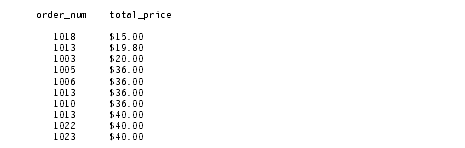
Query 5-9 finds pairs of orders where the ship_weight differs by a factor of five or more and the ship_date is not null. The query then orders the data by
ship_date.
If you want to store the results of a self-join into a temporary table, append an INTO TEMP clause to the SELECT statement and assign display labels to at least one set of columns to rename them. Otherwise, the duplicate column names cause an error and the temporary table is not created.
Query 5-10, which is similar to Query 5-9, labels all columns selected from the orders table and puts them in a temporary table called shipping.
If you query with SELECT * from table shipping, you see the rows that Query Result 5-10 shows.
You can join a table to itself more than once. The maximum number of self-joins depends on the resources available to you.
The self-join in Query 5-11 creates a list of those items in the stock table that are supplied by three manufacturers. The self-join includes the last two conditions in the WHERE clause to eliminate duplicate manufacturer codes in rows that are retrieved.
If you want to select rows from a payroll table to determine which employees earn more than their manager, you can construct the self-join that Query 5-12a shows.
Query 5-12b uses a correlated subquery to retrieve and list the 10 highest-priced items ordered.
Query 5-12b returns the 10 rows that Query Result 5-12 shows.
You can create a similar query to find and list the 10 employees in the company who have the most seniority.
Correlated and uncorrelated subqueries are described in Subqueries in SELECT Statements.
You can use the hidden rowid column in a self-join to locate duplicate values in a table. In the following example, the condition x.rowid != y.rowid is equivalent to saying "row x is not the same row as row y."
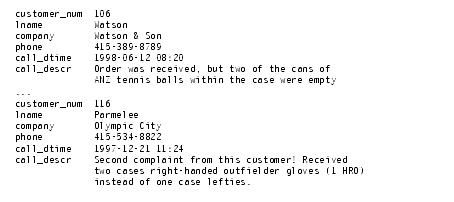
Query 5-13 selects data twice from the cust_calls table, assigning it the table aliases x and y.
Query 5-13 searches for duplicate values in the customer_num column and for their rowids, finding the pair that Query Result 5-13 shows.
For information about rowids, see Using Rowid Values In SELECT Statements.
The section Creating a Join shows how to create and use some simple joins. Whereas a simple join treats two or more joined tables equally, an outer join treats two or more joined tables asymmetrically. An outer join makes one of the tables dominant (also called preserved) over the other subservient tables.
The database server supports the following three basic types of outer joins:
This section discusses these types of outer joins. For more information on the syntax, use, and logic of outer joins, see the Informix Guide to SQL: Syntax.
In a simple join, the result contains only the combinations of rows from the tables that satisfy the join conditions. Rows that do not satisfy the join conditions are discarded.
In an outer join, the result contains the combinations of rows from the tables that satisfy the join conditions. In addition, the result preserves rows from the dominant table that would otherwise be discarded because no matching row was found in the subservient table. The dominant-table rows that do not have a matching subservient-table row receive nulls for the columns of the subservient table.
An outer join applies conditions to the subservient table while it sequentially applies the join conditions to the rows of the dominant table. The conditions are expressed in a WHERE clause.
An outer join must have a SELECT clause, a FROM clause, and a WHERE clause. To transform a simple join into an outer join, insert the keyword OUTER directly before the name of the subservient tables in the FROM clause. As shown later in this section, you can include the OUTER keyword more than once in your query.
Before you use outer joins heavily, determine whether one or more simple joins can work. You can often use a simple join when you do not need supplemental information from other tables.
The examples in this section use table aliases for brevity. The section Using Aliases discusses table aliases.
Query 5-14 is an example of a simple join on the customer and cust_calls tables.
Query 5-14 returns only those rows in which the customer has made a call to customer service, as Query Result 5-14 shows.
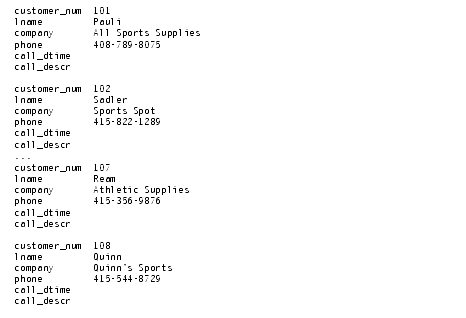
Query 5-15 uses the same select list, tables, and comparison condition as the preceding example, but this time it creates a simple outer join.
The addition of the keyword OUTER before the cust_calls table makes it the subservient table. An outer join causes the query to return information on all customers, whether or not they have made calls to customer service. All rows from the dominant customer table are retrieved, and null values are assigned to columns of the subservient cust_calls table, as Query Result 5-15 shows.
Query 5-16 shows an outer join that is the result of a simple join to a third table. This second type of outer join is known as a nested simple join.
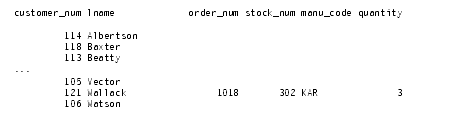
Query 5-16 first performs a simple join on the orders and items tables, retrieving information on all orders for items with a manu_code of KAR or SHM. It then performs an outer join to combine this information with data from the dominant customer table. An optional ORDER BY clause reorganizes the data into the form that Query Result 5-16 shows.
Query 5-17 shows an outer join that is the result of an outer join of each of two tables to a third table. In this third type of outer join, join relationships are possible only between the dominant table and the subservient tables.
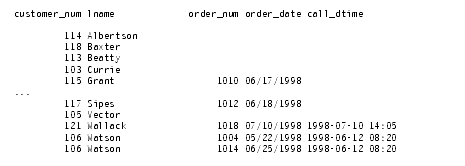
Query 5-17 individually joins the subservient tables orders and cust_calls to the dominant customer table; it does not join the two subservient tables. An INTO TEMP clause selects the results into a temporary table for further manipulation or queries, as Query Result 5-17 shows.
If Query 5-17 had tried to create a join condition between the two subservient tables o and x, as Query 5-18 shows, an error message would indicate the creation of a two-sided outer join.
To achieve multiple levels of nesting, you can create a join that employs any combination of the three types of outer joins. Query 5-19 creates a join that is the result of a combination of a simple outer join on two tables and a second outer join.
Query 5-19 first performs an outer join on the orders and items tables, retrieving information on all orders for items with a manu_code of KAR or SHM. It then performs a second outer join that combines this information with data from the dominant customer table.
You can state the join conditions in two ways when you apply an outer join to the result of an outer join to a third table. The two subservient tables are joined, but you can join the dominant table to either subservient table without affecting the results if the dominant table and the subservient table share a common column.